Start with one timed source and its reviewed translation
To show two languages together, put the corresponding source and translated text inside the same SRT cue. One cue has a number, a start time, an end time and one or more text lines, followed by a blank line. The two languages share that interval. Starting from one timed transcript makes their relationship easier to inspect. If you start with two unrelated subtitle files, identical cue numbers do not prove that the sentences match. Different cuts, omissions and sentence divisions can all create misleading pairings.
Use the sample to understand the structure
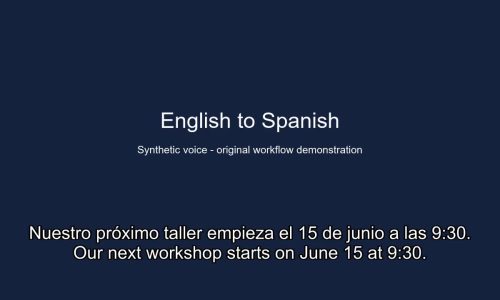
The downloadable example contains Spanish above English. Cue 3 begins at 00:00:07,950 and ends at 00:00:12,149. Both sentences announce the next workshop on June 15 at 9:30. Play the accompanying English demonstration and seek to eight seconds. You should see the two versions of that announcement together. By thirteen seconds this cue has ended, although the complete sample contains other cues later in the recording. Compare the time and the wording, rather than judging the file solely by whether a player lists it in a menu.
Create the pair from the final recording
Open the bilingual subtitle tool, upload the video you are delivering and select the language actually spoken. Review the source transcript while replaying the recording, then check its translation. Verify names and instructions against the approved material. When the active subtitle has a translation, the download dialog offers Bilingual alongside Source only and Translated only. Choose SRT and Bilingual for a combined file. Save the final video and exported subtitle with related version names so another editor can identify which files belong together.
SRT → Bilingual · Source only · Translated only
Decide which language belongs on top
Pick an order that supports the viewing task and keep it consistent throughout the file. A learner may want the language being studied first, while a reviewer may prefer the translated wording first. Confirm the actual exported result instead of assuming the order from a language label. If you need to reverse an existing SRT manually, move whole language passages within each cue and leave its timing intact. Some sentences occupy more than one text line, so swapping every adjacent pair of physical lines can break a passage.
Reduce reading load without changing meaning
Read the two languages at normal playback speed. Look for a translated clause that requires more time than the source, a date separated from its month, or a short instruction that wraps over a button in the picture. Shorten wording only where the meaning survives. If you divide a cue, divide both languages at corresponding ideas and check the new times against the speech. A blank line separates SRT cues, so an extra empty line inserted between languages can make a player interpret the file incorrectly.
Diagnose a mismatch before shifting timestamps
Check three phrases you can recognize by listening and compare their start times with the subtitles. A constant offset suggests something changed before all three phrases, such as an added opening. If the first two match and the third is late, inspect the edit between them. Shifting the entire file would disturb the correct matches. If words are missing in only one language, inspect the text pairing before touching timing. If the mismatch grows gradually, confirm the exact video version being played and where the divergence begins.
Test the final player and prepare the handoff
Keep the subtitle file in UTF-8 and open it in the player or editor that will be used for delivery. Check accents, non-Latin letters, punctuation and line wrapping. On a small display, two language passages may occupy more than two visible lines. Check mixed right-to-left and left-to-right text at actual playback size. SRT does not guarantee separate font sizes for the two languages. Provide a separate source-language and translated-language file if the publisher needs independent tracks, and record the paired video version and review status with the delivery.
An English–Spanish subtitle sample
This sample comes from EasySub’s existing demonstration with self-authored English synthetic speech. The bilingual output is shown as originally exported, with Spanish above English. It is an illustration for review, not a claim of professional human proofreading.
3
00:00:07,950 --> 00:00:12,149
Nuestro próximo taller empieza el 15 de junio a las 9:30.
Our next workshop starts on June 15 at 9:30.
Frequently asked questions
Can I merge two files by matching their cue numbers?
Check the sentences and timestamps first. Number 12 in one file may refer to a different passage in the other, especially after a cut or a different sentence split.
Why do both languages remain when I select the track?
They are text inside the same subtitle track. To offer a language menu with one language at a time, publish separate single-language tracks.