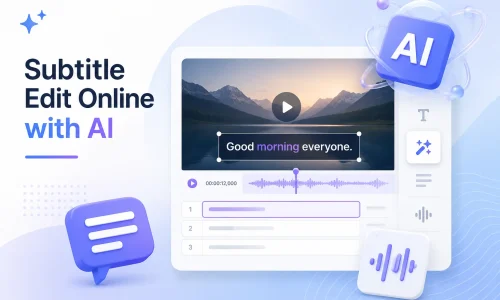
Grazie ai progressi della tecnologia AI, Subtitle Edit non è più limitato ai tradizionali software per computer desktop. Ora è possibile generare, modificare, sincronizzare, tradurre e convertire i sottotitoli direttamente nel browser, senza dover scaricare o installare software complessi. AI Subtitle Editor è in grado di riconoscere automaticamente l'audio dei video e generare rapidamente i sottotitoli.
Questo strumento online di editing di sottotitoli basato sull'intelligenza artificiale ti aiuta a modificare i file SRT più velocemente, a risolvere i problemi di sincronizzazione dei sottotitoli, a tradurre sottotitoli multilingue e persino a modificare il contenuto dei sottotitoli di YouTube. In questa guida, imparerai cos'è Subtitle Edit, come modificare i sottotitoli online e come utilizzare la tecnologia AI per migliorare l'efficienza della produzione di sottotitoli.
Sommario
Cos'è la modifica dei sottotitoli?
Modifica sottotitoli Si riferisce all'intero processo di creazione, modifica, sincronizzazione, traduzione ed esportazione dei file di sottotitoli. I file di sottotitoli includono in genere formati come SRT, VTT e ASS, utilizzati per visualizzare il testo nei contenuti video.
La modifica tradizionale dei sottotitoli si basa sul lavoro manuale. Gli utenti devono inserire manualmente il testo e regolare la timeline riga per riga. Questo processo richiede molto tempo. Le ricerche dimostrano che la creazione manuale di sottotitoli per un video di 1 minuto richiede in media dai 5 ai 10 minuti, a seconda della complessità del contenuto.
I moderni editor di sottotitoli vengono trasformati dalla tecnologia dell'intelligenza artificiale. Editor di sottotitoli basati sull'IA Possono riconoscere automaticamente il contenuto parlato e generare il testo iniziale dei sottotitoli. Allo stesso tempo, possono allineare automaticamente la timeline, riducendo la necessità di sincronizzazione manuale.
Nelle applicazioni pratiche, gli editor di sottotitoli basati sull'IA possono aumentare l'efficienza della produzione di sottotitoli del 60%–90%, in particolare in scenari che coinvolgono video multilingue, creazione di contenuti per YouTube e video di marketing.
Problemi comuni nella modifica dei sottotitoli
Nel processo di produzione dei sottotitoli, i problemi più frequenti riscontrati dagli utenti riguardano quattro aree principali: le tempistiche, l'efficienza, il supporto multilingue e la complessità delle operazioni della piattaforma.
a. La sincronizzazione dei sottotitoli non è corretta.
Il disallineamento temporale dei sottotitoli è uno dei problemi più comuni. In genere si verifica dopo il montaggio video, quando la timeline non è stata riallineata. Può anche derivare da errori nel riconoscimento automatico dei sottotitoli.
La soluzione di solito prevede la correzione manuale della temporizzazione tramite sincronizzazione dei sottotitoli o strumenti per la regolazione della temporizzazione dei sottotitoli. Tuttavia, in pratica, regolare manualmente ogni riga di sottotitoli richiede molto tempo.
b. La modifica manuale dei sottotitoli richiede troppo tempo
I tradizionali software di editing dei sottotitoli si basano sull'inserimento manuale e sulla revisione riga per riga. I problemi principali sono l'elevata ripetitività delle regolazioni della timeline e la difficoltà di elaborare in batch grandi volumi di video. Per i team di contenuti, soprattutto quelli che gestiscono canali YouTube o di video brevi, la produzione di sottotitoli diventa spesso un collo di bottiglia nel processo produttivo.
c. Necessità di sottotitoli in più lingue
I creatori di contenuti transfrontalieri in genere necessitano di sottotitoli multilingue, ad esempio in inglese, spagnolo o francese. La traduzione manuale è costosa e, poiché la lunghezza delle espressioni varia a seconda della lingua, è necessario riallineare le tempistiche. Gli strumenti di traduzione automatica dei sottotitoli possono migliorare l'efficienza, ma i metodi tradizionali richiedono comunque una revisione manuale. Nella distribuzione globale di contenuti, i sottotitoli multilingue sono uno dei fattori chiave per aumentare il tasso di visualizzazione.
d. Modificare i sottotitoli di YouTube è complicato
I sottotitoli di YouTube vengono generalmente gestiti tramite YouTube Studio o file SRT esterni. I flussi di lavoro sono incoerenti e la curva di apprendimento è ripida per i principianti. Anche l'accuratezza dei sottotitoli automatici è incoerente e spesso richiede ulteriori modifiche.
In che modo l'editor di sottotitoli basato sull'intelligenza artificiale risolve i problemi di modifica dei sottotitoli?
L'editor di sottotitoli basato sull'intelligenza artificiale migliora l'efficienza principalmente attraverso cinque processi chiave: generazione, modifica, sincronizzazione, traduzione ed esportazione.
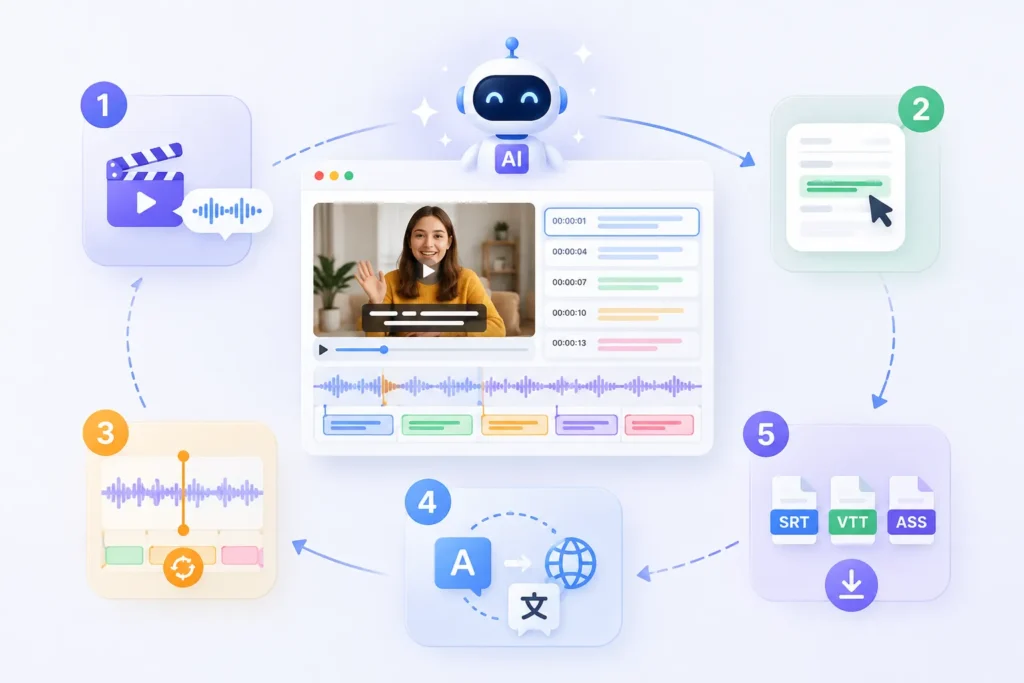
IL Generatore di sottotitoli AI È in grado di generare automaticamente i sottotitoli in base al riconoscimento vocale. Gli utenti non devono inserire il testo frase per frase. Il sistema estrae direttamente il parlato dall'audio del video e genera un file di sottotitoli iniziale. Rispetto ai metodi di trascrizione manuale tradizionali, l'efficienza è in genere migliorata di oltre 70%.
2. Modifica i sottotitoli online
Gli utenti possono modificare i sottotitoli direttamente nel browser, senza dover installare alcun software di editing. Tutti i sottotitoli vengono visualizzati su una timeline, consentendo rapide modifiche al testo, ristrutturazioni delle frasi e ottimizzazione dell'espressione. Lo strumento supporta anche l'anteprima video in tempo reale.
Il sistema di intelligenza artificiale allinea automaticamente i sottotitoli all'audio, riducendo la necessità di regolazioni manuali della temporizzazione. Anche se il video è stato modificato o tagliato, il sistema è in grado di ricalcolare le posizioni sulla timeline. Ciò si traduce in un notevole aumento di efficienza rispetto alle regolazioni manuali.
4. Traduci i sottotitoli all'istante
Traduzione automatica dei sottotitoli È in grado di convertire rapidamente i sottotitoli in diverse lingue, come inglese, spagnolo e francese. La traduzione finale mantiene automaticamente la struttura originale della timeline, eliminando la necessità di riformattare ogni riga singolarmente. Per la distribuzione transfrontaliera di contenuti, questo passaggio può ridurre significativamente i costi di manodopera.
5. Esporta SRT, VTT, ASS
Il sistema supporta l'esportazione in diversi formati di sottotitoli principali, tra cui SRT, VTT, e ASS. Gli utenti possono esportare i file direttamente per utilizzarli su diverse piattaforme: ad esempio, VTT è utilizzato su YouTube, mentre ASS è comunemente impiegato nella post-produzione cinematografica e televisiva.
Il processo fondamentale di modifica dei sottotitoli online è in realtà piuttosto standard. Grazie ai moderni editor di sottotitoli basati sull'intelligenza artificiale, questo processo è stato notevolmente semplificato. Gli utenti possono creare sottotitoli professionali con pochi semplici passaggi.
Passaggio 1: carica il tuo video
.webp)
Il primo passo consiste nel caricare un file video o incollare un link video. Il sistema analizzerà automaticamente il contenuto audio.
I formati comunemente supportati includono MP4, MOV e link di YouTube. Lo scopo principale di questa fase è consentire al sistema di acquisire i dati audio in preparazione alla successiva generazione dei sottotitoli.
-1024x700.webp)
Una volta completato il caricamento, il sistema di intelligenza artificiale riconosce automaticamente il parlato e genera i sottotitoli. Questo processo non richiede l'inserimento manuale del testo. Rispetto ai tradizionali software di editing di sottotitoli, il guadagno in termini di efficienza è significativo. Una prima bozza di sottotitoli viene in genere generata in pochi minuti.
Passaggio 3: Rivedi e modifica il testo dei sottotitoli
-1024x680.webp)
Una volta generati i sottotitoli, gli utenti possono accedere all'interfaccia di modifica per apportare modifiche, come correggere errori di battitura, adattare la struttura delle frasi e ottimizzare l'espressione semantica. Gli editor di sottotitoli online solitamente supportano l'anteprima video in tempo reale, facilitando la verifica dell'accuratezza dei contenuti in sincronia con il video.
Passaggio 4: Regolare la sincronizzazione dei sottotitoli
Se si verifica una discrepanza tra i sottotitoli e l'audio, è possibile regolare la timeline manualmente o automaticamente. Gli strumenti basati sull'intelligenza artificiale offrono solitamente una funzione di sincronizzazione dei sottotitoli che si allinea automaticamente al ritmo del parlato. Per i video di YouTube o i contenuti video di breve durata, questo passaggio può ridurre significativamente il tempo necessario per la correzione manuale.
Passaggio 5: Esportare i file dei sottotitoli
-1024x486.webp)
Il passaggio finale consiste nell'esportare i file dei sottotitoli. I formati più comuni includono:
- SRT (formato universale dei sottotitoli)
- VTT (utilizzato per il web e YouTube)
- ASS (per la post-produzione cinematografica e televisiva)
È possibile scaricarli direttamente o incorporarli nel proprio video per utilizzarli.
Come modificare i sottotitoli di YouTube (3 metodi pratici spiegati)
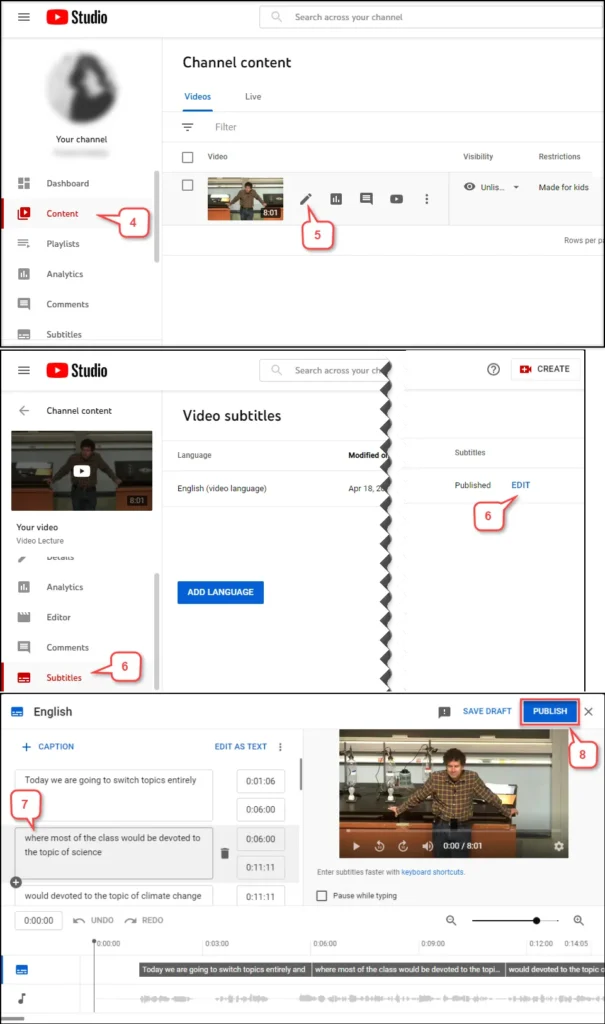
Esistono tre modi principali per modificare i sottotitoli di YouTube: modificarli direttamente in YouTube Studio, scaricare un file SRT per la modifica manuale e utilizzare uno strumento di modifica dei sottotitoli basato sull'intelligenza artificiale per l'elaborazione automatica.
Metodo 1: Modificare i sottotitoli in YouTube Studio
Questo è il metodo più semplice. È possibile modificare direttamente i sottotitoli generati automaticamente o i file di sottotitoli caricati in YouTube Studio. Il processo è relativamente semplice, ma le funzionalità sono limitate. I problemi principali, tuttavia, sono che l'interfaccia di modifica non è molto intuitiva e le regolazioni della timeline sono inefficienti, il che lo rende inadatto all'elaborazione in batch di video. È adatto solo per piccole modifiche a singoli video.
Metodo 2: Scarica il file SRT e modificalo manualmente
Il secondo metodo prevede l'esportazione del file dei sottotitoli (di solito in formato SRT) e la successiva modifica tramite un software di editing. Innanzitutto, si scaricano i sottotitoli, li si modifica localmente e infine li si carica nuovamente su YouTube.
Il vantaggio di questo approccio è che offre un controllo più preciso, consentendo di regolare la tempistica e il contenuto testuale di ogni sottotitolo. Tuttavia, prevede diversi passaggi e si basa su un software di editing di sottotitoli. È adatto a utenti con esperienza nella produzione di sottotitoli.
Metodo 3: Utilizzare un editor di sottotitoli basato sull'intelligenza artificiale
Il terzo metodo è attualmente la soluzione più efficiente. Un editor di sottotitoli basato sull'intelligenza artificiale può gestire direttamente l'intero processo: caricamento del video → generazione automatica dei sottotitoli → sincronizzazione automatica della timeline → modifica online → esportazione con un solo clic. Rispetto ai metodi tradizionali, questo approccio può ridurre i tempi di produzione dei sottotitoli di circa 60%–90%. Inoltre, supporta la generazione e la traduzione di sottotitoli multilingue, risultando ideale per la gestione di contenuti YouTube a livello internazionale.
È possibile modificare i sottotitoli di Anilab? (Spiegazione dei sottotitoli incorporati e modificabili)
Se i sottotitoli sono file separati, come SRT o VTT, puoi modificarli direttamente utilizzando un editor di sottotitoli. Se i sottotitoli sono incorporati direttamente nel video (sottotitoli incorporati), non puoi modificare il testo direttamente; dovrai prima estrarre i sottotitoli o utilizzare il riconoscimento OCR.
Caso 1: Sottotitoli modificabili
Quando i sottotitoli sono disponibili come file separati, ad esempio in formato SRT o VTT, è possibile modificarli direttamente.
Scarica il file dei sottotitoli → Apri un editor di sottotitoli → Modifica il testo e la timeline → Riesporta
Questo metodo è semplice e funziona per i sottotitoli esportati dalla maggior parte delle principali piattaforme video.
Caso 2: Sottotitoli incorporati
Se i sottotitoli sono stati "incorporati" nel fotogramma video, vengono considerati sottotitoli incorporati. In questo caso, i sottotitoli non sono più un file separato e non possono essere modificati direttamente. In genere, è necessario utilizzare uno strumento OCR per riconoscere i sottotitoli o trascrivere l'audio per generare nuovi sottotitoli.
Questo processo è più complesso della normale modifica dei sottotitoli e può comportare errori di riconoscimento.
Nel flusso di lavoro effettivo di elaborazione dei sottotitoli, si raccomanda di dare priorità all'ottenimento del file originale dei sottotitoli. Se è disponibile solo il file video, sarà necessario affidarsi a un editor di sottotitoli basato sull'intelligenza artificiale per rigenerare i sottotitoli.
Domande frequenti sulla modifica dei sottotitoli
D1. Cos'è la modifica dei sottotitoli?
L'editing dei sottotitoli si riferisce al processo di creazione, modifica, sincronizzazione, traduzione ed esportazione dei file di sottotitoli. I formati di sottotitoli più comuni includono SRT, VTT e ASS. L'obiettivo principale è garantire che i sottotitoli siano sincronizzati correttamente con l'audio del video.
D2. Come si modificano i sottotitoli online?
La modifica dei sottotitoli online in genere prevede tre fasi: caricamento del video, generazione automatica dei sottotitoli e modifica del contenuto e della timeline online. I moderni editor di sottotitoli supportano le operazioni tramite browser, consentendo di completare le modifiche senza installare alcun software.
D3. Posso modificare i sottotitoli di YouTube?
Sì, è possibile modificare i sottotitoli di YouTube. Puoi modificarli direttamente in YouTube Studio oppure scaricare il file SRT, modificarlo con un software di editing per sottotitoli e poi ricaricarlo.
D4. Posso modificare i file SRT?
SÌ. SRT è uno dei formati di sottotitoli più comuni. Puoi aprirlo con un editor di sottotitoli per modificarne il contenuto testuale e la timeline, quindi riesportarlo per utilizzarlo.
D5. Quali formati di sottotitoli sono supportati?
I formati di sottotitoli più diffusi includono SRT, VTT, ASS, SSA e STL. Piattaforme diverse utilizzano formati diversi; ad esempio, YouTube usa comunemente VTT, mentre le produzioni cinematografiche e televisive spesso utilizzano ASS.
Sì. Un generatore di sottotitoli basato sull'intelligenza artificiale può riconoscere automaticamente il parlato in un video e generare sottotitoli, supportando al contempo la sincronizzazione della timeline e la traduzione multilingue, migliorando significativamente l'efficienza della produzione.
D7. Qual è il miglior editor di sottotitoli?
Il miglior strumento per la modifica dei sottotitoli dipende dal caso d'uso. I software tradizionali per la modifica manuale dei sottotitoli sono adatti per l'editing professionale, mentre un editor di sottotitoli basato sull'intelligenza artificiale è più indicato per la generazione rapida, l'elaborazione in batch e le esigenze di sottotitoli multilingue.
Inizia a usare EasySub per migliorare i tuoi video oggi stesso

EasySub è uno strumento online di editing di sottotitoli basato sull'intelligenza artificiale che aiuta gli utenti a completare rapidamente l'intero processo di generazione, modifica, sincronizzazione e traduzione dei sottotitoli. Puoi creare sottotitoli di qualità professionale direttamente nel tuo browser, senza bisogno di scaricare o installare alcun software.
È sufficiente caricare un video e il sistema genererà automaticamente i sottotitoli. È quindi possibile modificare il testo e regolare la timeline online, visualizzando l'anteprima in tempo reale. Questo processo semplificato è più efficiente e più adatto a chi crea contenuti frequentemente e ai team. Supporta l'esportazione in diversi formati di sottotitoli diffusi, tra cui SRT, VTT e ASS, per soddisfare le esigenze di vari scenari come YouTube, i social media e la produzione cinematografica e televisiva.
👉 Clicca qui per una prova gratuita: easyssub.com
Grazie per aver letto questo blog. Non esitate a contattarci per ulteriori domande o esigenze di personalizzazione!