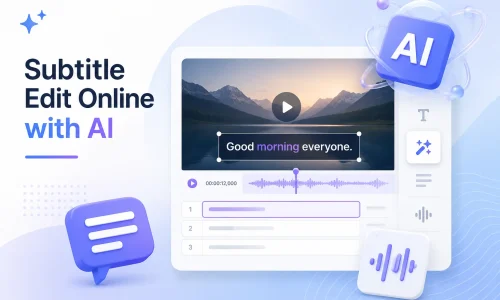
Với sự tiến bộ của công nghệ AI, việc chỉnh sửa phụ đề không còn bị giới hạn bởi phần mềm máy tính để bàn truyền thống. Giờ đây, bạn có thể tạo, chỉnh sửa, đồng bộ hóa, dịch và chuyển đổi phụ đề trực tiếp trên trình duyệt của mình mà không cần phải tải xuống hoặc cài đặt phần mềm phức tạp. Trình chỉnh sửa phụ đề AI có thể tự động nhận diện âm thanh video và nhanh chóng tạo phụ đề.
Công cụ chỉnh sửa phụ đề trực tuyến bằng trí tuệ nhân tạo này giúp bạn chỉnh sửa các tệp SRT nhanh hơn, khắc phục sự cố đồng bộ hóa phụ đề, dịch phụ đề đa ngôn ngữ và thậm chí chỉnh sửa nội dung phụ đề trên YouTube. Trong hướng dẫn này, bạn sẽ tìm hiểu Subtitle Edit là gì, cách chỉnh sửa phụ đề trực tuyến và cách sử dụng công nghệ AI để nâng cao hiệu quả sản xuất phụ đề.
Mục lục
Chỉnh sửa phụ đề là gì?
Chỉnh sửa phụ đề Thuật ngữ này đề cập đến toàn bộ quy trình tạo, chỉnh sửa, đồng bộ hóa, dịch thuật và xuất file phụ đề. File phụ đề thường bao gồm các định dạng như SRT, VTT và ASS, được sử dụng để hiển thị văn bản trong nội dung video.
Việc chỉnh sửa phụ đề truyền thống dựa vào thao tác thủ công. Người dùng phải nhập văn bản và điều chỉnh dòng thời gian từng dòng một. Quá trình này khá tốn thời gian. Nghiên cứu cho thấy việc tạo phụ đề thủ công cho video dài 1 phút mất trung bình 5-10 phút, tùy thuộc vào độ phức tạp của nội dung.
Các phần mềm chỉnh sửa phụ đề hiện đại đang được chuyển đổi nhờ công nghệ trí tuệ nhân tạo. Trình chỉnh sửa phụ đề AI Chúng có thể tự động nhận diện nội dung lời nói và tạo văn bản phụ đề ban đầu. Đồng thời, chúng có thể tự động căn chỉnh dòng thời gian, giảm thiểu nhu cầu đồng bộ hóa thủ công.
Trong các ứng dụng thực tế, trình biên tập phụ đề AI có thể tăng hiệu quả sản xuất phụ đề lên 60%–90%, đặc biệt trong các trường hợp liên quan đến video đa ngôn ngữ, tạo nội dung YouTube và video tiếp thị.
Những thách thức thường gặp khi chỉnh sửa phụ đề
Trong quá trình sản xuất phụ đề thực tế, các vấn đề người dùng thường gặp nhất tập trung vào bốn lĩnh vực: tiến độ, hiệu quả, hỗ trợ đa ngôn ngữ và độ phức tạp của hoạt động nền tảng.
a. Thời gian hiển thị phụ đề không đồng bộ
Việc lệch thời gian phụ đề là một trong những vấn đề phổ biến nhất. Nó thường xảy ra sau khi chỉnh sửa video khi dòng thời gian chưa được căn chỉnh lại. Nó cũng có thể là do lỗi trong quá trình nhận dạng phụ đề tự động.
Giải pháp thường bao gồm việc điều chỉnh thời gian thủ công bằng cách sử dụng đồng bộ phụ đề hoặc các công cụ điều chỉnh thời gian phụ đề. Tuy nhiên, trên thực tế, việc điều chỉnh thủ công từng dòng phụ đề rất tốn thời gian.
b. Chỉnh sửa phụ đề thủ công tốn quá nhiều thời gian
Phần mềm chỉnh sửa phụ đề truyền thống dựa vào nhập liệu thủ công và hiệu đính từng dòng. Các vấn đề chính là sự lặp đi lặp lại cao của việc điều chỉnh dòng thời gian và khó khăn trong việc xử lý hàng loạt khối lượng video lớn. Đối với các nhóm nội dung—đặc biệt là những người quản lý kênh YouTube hoặc các kênh video ngắn—việc sản xuất phụ đề thường trở thành nút thắt cổ chai trong quy trình sản xuất.
c. Nhu cầu phụ đề bằng nhiều ngôn ngữ
Những người sáng tạo nội dung xuyên biên giới thường yêu cầu hỗ trợ phụ đề đa ngôn ngữ, chẳng hạn như tiếng Anh, tiếng Tây Ban Nha hoặc tiếng Pháp. Dịch thuật thủ công tốn kém, và vì độ dài của các cụm từ khác nhau giữa các ngôn ngữ, nên thời gian thực hiện phải được điều chỉnh lại. Các công cụ dịch phụ đề có thể cải thiện hiệu quả, nhưng các phương pháp truyền thống vẫn yêu cầu hiệu đính thủ công. Trong phân phối nội dung toàn cầu, phụ đề đa ngôn ngữ là một trong những yếu tố quan trọng để cải thiện tỷ lệ xem hết nội dung.
d. Chỉnh sửa phụ đề YouTube rất phức tạp
Phụ đề trên YouTube thường được quản lý thông qua YouTube Studio hoặc các tệp SRT bên ngoài. Quy trình làm việc không nhất quán và người mới bắt đầu sẽ gặp khó khăn trong việc học hỏi. Độ chính xác của phụ đề tự động cũng không ổn định, thường cần chỉnh sửa thêm.
Trình chỉnh sửa phụ đề AI giải quyết các vấn đề chỉnh sửa phụ đề như thế nào?
Công cụ chỉnh sửa phụ đề AI chủ yếu cải thiện hiệu quả thông qua năm quy trình chính: tạo, chỉnh sửa, đồng bộ hóa, dịch thuật và xuất khẩu.
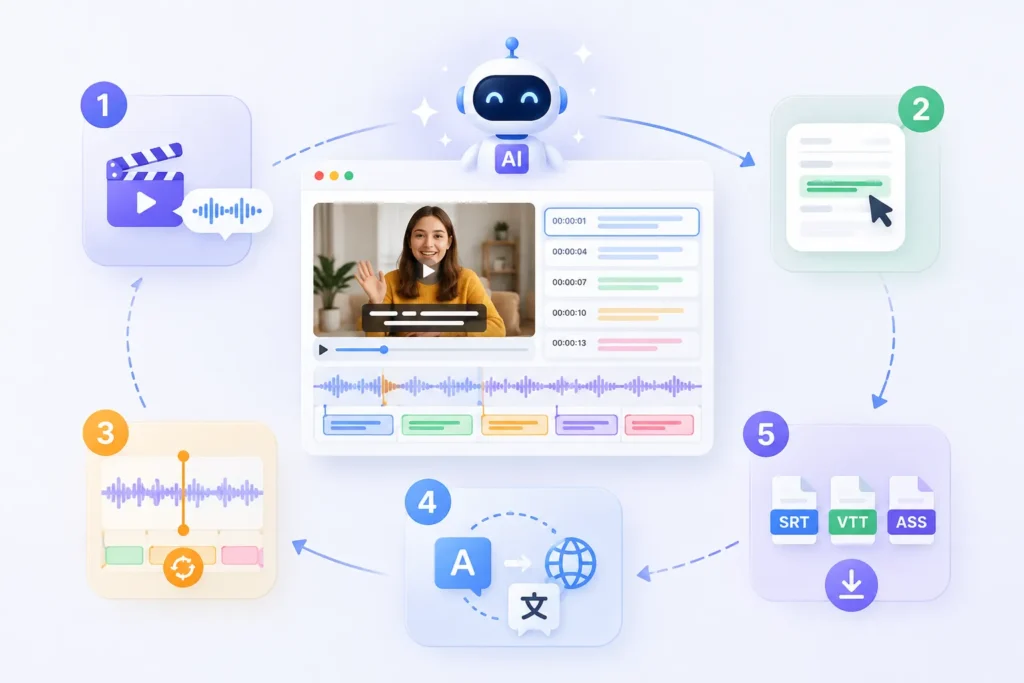
Các Trình tạo phụ đề AI Hệ thống có thể tự động tạo nội dung phụ đề dựa trên nhận dạng giọng nói. Người dùng không cần nhập văn bản từng câu một. Hệ thống trực tiếp trích xuất giọng nói từ âm thanh của video và tạo ra tệp phụ đề ban đầu. So với các phương pháp phiên âm thủ công truyền thống, hiệu quả thường được cải thiện hơn 70%.
2. Chỉnh sửa phụ đề trực tuyến
Người dùng có thể chỉnh sửa nội dung phụ đề trực tiếp trên trình duyệt mà không cần cài đặt bất kỳ phần mềm chỉnh sửa phụ đề nào. Tất cả phụ đề được hiển thị trên dòng thời gian, cho phép chỉnh sửa văn bản nhanh chóng, cấu trúc lại câu và tối ưu hóa cách diễn đạt. Công cụ này cũng hỗ trợ xem trước video theo thời gian thực.
Hệ thống AI tự động căn chỉnh phụ đề với âm thanh, giảm thiểu nhu cầu điều chỉnh thời gian thủ công. Ngay cả khi video đã được chỉnh sửa hoặc cắt bớt, hệ thống vẫn có thể tính toán lại vị trí trên dòng thời gian. Điều này giúp tăng hiệu quả đáng kể so với việc điều chỉnh thủ công.
4. Dịch phụ đề tức thì
Dịch phụ đề bằng AI Phần mềm có thể nhanh chóng chuyển đổi phụ đề sang nhiều ngôn ngữ, chẳng hạn như tiếng Anh, tiếng Tây Ban Nha và tiếng Pháp. Kết quả dịch tự động giữ nguyên cấu trúc dòng thời gian ban đầu, loại bỏ nhu cầu định dạng lại từng dòng riêng lẻ. Đối với việc phân phối nội dung xuyên biên giới, bước này có thể giảm đáng kể chi phí nhân công.
5. Xuất SRT, VTT, ASS
Hệ thống hỗ trợ xuất phụ đề sang nhiều định dạng phổ biến, bao gồm: SRT, VTT, và ASS. Người dùng có thể xuất trực tiếp các tệp để sử dụng trên các nền tảng khác nhau — ví dụ, VTT được sử dụng trên YouTube, trong khi ASS thường được sử dụng trong hậu kỳ phim và truyền hình.
Quy trình cốt lõi của việc chỉnh sửa phụ đề trực tuyến thực chất khá chuẩn. Đối với các trình chỉnh sửa phụ đề AI hiện đại, quy trình này đã được đơn giản hóa đáng kể. Người dùng có thể tạo phụ đề chuyên nghiệp chỉ với một vài bước đơn giản.
Bước 1: Tải video của bạn lên
.webp)
Bước đầu tiên là tải lên tệp video hoặc dán liên kết video. Hệ thống sẽ tự động phân tích nội dung âm thanh.
Các định dạng được hỗ trợ phổ biến bao gồm MP4, MOV và liên kết YouTube. Mục đích chính của bước này là cho phép hệ thống thu thập dữ liệu âm thanh để chuẩn bị cho việc tạo phụ đề sau đó.
-1024x700.webp)
Sau khi quá trình tải lên hoàn tất, hệ thống AI sẽ tự động nhận dạng giọng nói và tạo phụ đề. Quá trình này không yêu cầu nhập văn bản thủ công. So với phần mềm chỉnh sửa phụ đề truyền thống, hiệu quả đạt được là rất đáng kể. Bản nháp phụ đề đầu tiên thường được tạo chỉ trong vài phút.
Bước 3: Xem lại và chỉnh sửa văn bản phụ đề
-1024x680.webp)
Sau khi phụ đề được tạo xong, người dùng có thể truy cập giao diện chỉnh sửa để thực hiện các thay đổi, chẳng hạn như sửa lỗi chính tả, điều chỉnh cấu trúc câu và tối ưu hóa cách diễn đạt ngữ nghĩa. Các trình chỉnh sửa phụ đề trực tuyến thường hỗ trợ xem trước video theo thời gian thực, giúp dễ dàng kiểm tra độ chính xác của nội dung đồng bộ với video.
Bước 4: Điều chỉnh thời gian phụ đề
Nếu có sự khác biệt giữa phụ đề và âm thanh, bạn có thể điều chỉnh dòng thời gian thủ công hoặc tự động. Các công cụ AI thường cung cấp tính năng đồng bộ phụ đề tự động khớp với nhịp điệu của lời nói. Đối với video YouTube hoặc nội dung video ngắn, bước này có thể giảm đáng kể thời gian cần thiết cho việc chỉnh sửa thủ công.
Bước 5: Xuất tệp phụ đề
-1024x486.webp)
Bước cuối cùng là xuất các tệp phụ đề. Các định dạng phổ biến bao gồm:
- SRT (định dạng phụ đề phổ quát)
- VTT (được sử dụng cho web và YouTube)
- ASS (dành cho hậu kỳ phim và truyền hình)
Bạn có thể tải chúng xuống trực tiếp hoặc nhúng chúng vào video của mình để sử dụng.
Hướng dẫn chỉnh sửa phụ đề YouTube (3 phương pháp thực tế được giải thích chi tiết)
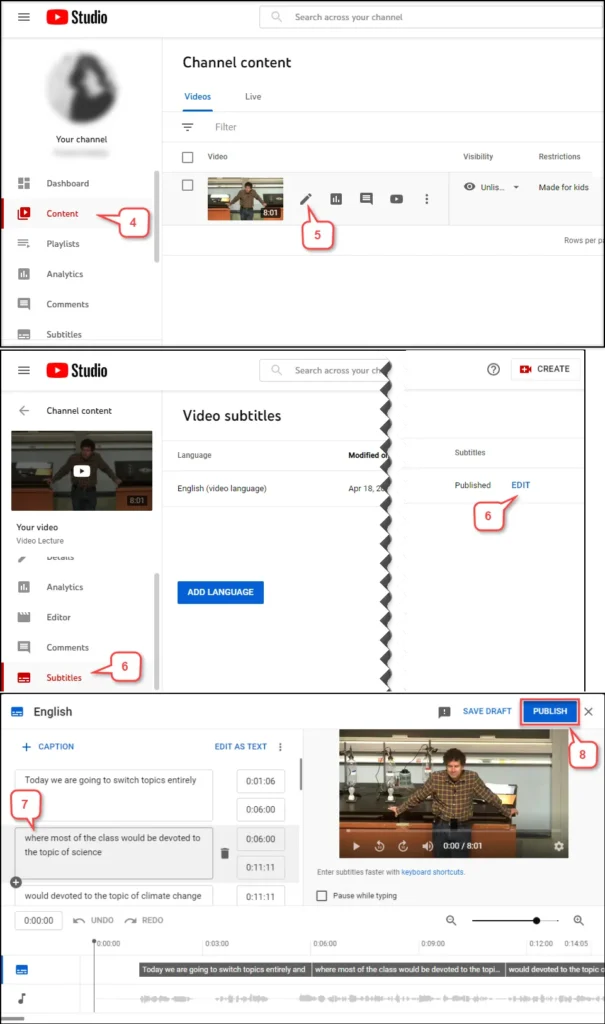
Có ba cách chính để chỉnh sửa phụ đề YouTube: chỉnh sửa trực tiếp trong YouTube Studio, tải xuống tệp SRT để chỉnh sửa thủ công và sử dụng công cụ chỉnh sửa phụ đề bằng AI để xử lý tự động.
Phương pháp 1: Chỉnh sửa phụ đề trong YouTube Studio
Đây là phương pháp cơ bản nhất. Bạn có thể trực tiếp chỉnh sửa phụ đề được tạo tự động hoặc các tệp phụ đề đã tải lên trong YouTube Studio. Quá trình này tương đối đơn giản, nhưng chức năng bị hạn chế. Tuy nhiên, vấn đề chính là giao diện chỉnh sửa không trực quan lắm và việc điều chỉnh dòng thời gian không hiệu quả, khiến nó không phù hợp cho việc xử lý hàng loạt video. Nó chỉ phù hợp cho việc chỉnh sửa nhỏ đối với từng video riêng lẻ.
Phương pháp 2: Tải xuống tệp SRT và chỉnh sửa thủ công
Phương pháp thứ hai bao gồm việc xuất tệp phụ đề (thường ở định dạng SRT) và sau đó chỉnh sửa bằng phần mềm chỉnh sửa phụ đề. Đầu tiên, tải phụ đề xuống, chỉnh sửa chúng trên máy tính của bạn, rồi tải chúng lên lại YouTube.
Ưu điểm của phương pháp này là cho phép kiểm soát chính xác hơn, điều chỉnh thời gian và nội dung văn bản của từng phụ đề. Tuy nhiên, nó bao gồm nhiều bước và phụ thuộc vào phần mềm chỉnh sửa phụ đề. Phương pháp này phù hợp với người dùng có kinh nghiệm trong sản xuất phụ đề.
Phương pháp 3: Sử dụng trình chỉnh sửa phụ đề AI
Phương pháp thứ ba hiện là giải pháp hiệu quả nhất. Trình chỉnh sửa phụ đề AI có thể xử lý toàn bộ quy trình trực tiếp: tải video lên → tự động tạo phụ đề → tự động đồng bộ hóa dòng thời gian → chỉnh sửa trực tuyến → xuất chỉ với một cú nhấp chuột. So với các phương pháp truyền thống, cách tiếp cận này có thể giảm thời gian sản xuất phụ đề khoảng 601 giây đến 901 giây. Ngoài ra, nó hỗ trợ tạo và dịch phụ đề đa ngôn ngữ, lý tưởng cho các hoạt động nội dung YouTube quốc tế.
Bạn có thể chỉnh sửa phụ đề Anilab không? (Giải thích sự khác biệt giữa phụ đề nhúng và phụ đề có thể chỉnh sửa)
Nếu phụ đề là các tệp riêng biệt, chẳng hạn như SRT hoặc VTT, bạn có thể chỉnh sửa trực tiếp bằng trình chỉnh sửa phụ đề. Nếu phụ đề được nhúng trực tiếp vào video (phụ đề nhúng), bạn không thể chỉnh sửa trực tiếp văn bản; bạn cần trích xuất phụ đề hoặc sử dụng nhận dạng ký tự quang học (OCR) trước.
Trường hợp 1: Phụ đề có thể chỉnh sửa
Khi phụ đề được lưu trữ dưới dạng các tệp riêng biệt, chẳng hạn như SRT hoặc VTT, bạn có thể chỉnh sửa chúng trực tiếp.
Tải xuống tệp phụ đề → Mở trình chỉnh sửa phụ đề → Chỉnh sửa văn bản và dòng thời gian → Xuất lại
Phương pháp này đơn giản và hiệu quả với phụ đề được xuất từ hầu hết các nền tảng video phổ biến.
Trường hợp 2: Phụ đề nhúng
Nếu phụ đề được "nhúng" vào khung hình video, chúng được coi là phụ đề nhúng. Trong trường hợp này, phụ đề không còn là một tệp riêng biệt và không thể chỉnh sửa trực tiếp. Thông thường, bạn sẽ cần sử dụng công cụ OCR để nhận dạng phụ đề hoặc chuyển đổi âm thanh thành văn bản để tạo phụ đề mới.
Quá trình này phức tạp hơn so với việc chỉnh sửa phụ đề thông thường và có thể xảy ra lỗi nhận dạng.
Trong quy trình xử lý phụ đề thực tế, nên ưu tiên việc có được tệp phụ đề gốc. Nếu chỉ có tệp video, bạn sẽ cần dựa vào trình chỉnh sửa phụ đề bằng AI để tạo lại phụ đề.
Câu hỏi thường gặp về chỉnh sửa phụ đề
Câu 1. Chỉnh sửa phụ đề là gì?
Chỉnh sửa phụ đề bao gồm quá trình tạo, sửa đổi, đồng bộ hóa, dịch thuật và xuất các tệp phụ đề. Các định dạng phụ đề phổ biến bao gồm SRT, VTT và ASS. Mục tiêu chính là đảm bảo phụ đề được đồng bộ chính xác với âm thanh của video.
Câu 2. Tôi có thể chỉnh sửa phụ đề trực tuyến như thế nào?
Việc chỉnh sửa phụ đề trực tuyến thường bao gồm ba bước: tải video lên, tạo phụ đề tự động và chỉnh sửa nội dung cũng như dòng thời gian trực tuyến. Các trình chỉnh sửa phụ đề hiện đại hỗ trợ thao tác trên trình duyệt, cho phép bạn hoàn tất chỉnh sửa mà không cần cài đặt bất kỳ phần mềm nào.
Câu 3. Tôi có thể chỉnh sửa phụ đề YouTube không?
Có, bạn có thể chỉnh sửa phụ đề YouTube. Bạn có thể chỉnh sửa trực tiếp trong YouTube Studio, hoặc tải xuống tệp SRT, chỉnh sửa bằng phần mềm chỉnh sửa phụ đề, rồi tải lại lên.
Câu 4. Tôi có thể chỉnh sửa các tệp SRT không?
Đúng. SRT Đây là một trong những định dạng phụ đề phổ biến nhất. Bạn có thể mở nó bằng trình chỉnh sửa phụ đề để sửa đổi nội dung văn bản và dòng thời gian, sau đó xuất lại để sử dụng.
Câu 5. Những định dạng phụ đề nào được hỗ trợ?
Các định dạng phụ đề phổ biến bao gồm SRT, VTT, ASS, SSA và STL. Các nền tảng khác nhau sử dụng các định dạng khác nhau; ví dụ, YouTube thường sử dụng VTT, trong khi sản xuất phim và truyền hình thường sử dụng ASS.
Đúng vậy. Trình tạo phụ đề AI có thể tự động nhận diện giọng nói trong video và tạo phụ đề, đồng thời hỗ trợ đồng bộ hóa dòng thời gian và dịch đa ngôn ngữ, giúp cải thiện đáng kể hiệu quả sản xuất.
Câu 7. Phần mềm chỉnh sửa phụ đề tốt nhất là gì?
Công cụ chỉnh sửa phụ đề tốt nhất phụ thuộc vào mục đích sử dụng. Phần mềm chỉnh sửa phụ đề truyền thống phù hợp cho việc chỉnh sửa thủ công chuyên nghiệp, trong khi trình chỉnh sửa phụ đề bằng AI phù hợp hơn cho việc tạo phụ đề nhanh chóng, xử lý hàng loạt và đáp ứng nhu cầu phụ đề đa ngôn ngữ.
Bắt đầu sử dụng EasySub để nâng cao chất lượng video của bạn ngay hôm nay

EasySub Đây là công cụ chỉnh sửa phụ đề trực tuyến được hỗ trợ bởi trí tuệ nhân tạo, giúp người dùng nhanh chóng hoàn thành toàn bộ quy trình tạo, chỉnh sửa, đồng bộ hóa và dịch phụ đề. Bạn có thể tạo phụ đề chất lượng chuyên nghiệp ngay trên trình duyệt của mình—không cần tải xuống hoặc cài đặt phần mềm.
Chỉ cần tải video lên, hệ thống sẽ tự động tạo phụ đề. Sau đó, bạn có thể chỉnh sửa văn bản và điều chỉnh dòng thời gian trực tuyến trong khi xem trước kết quả theo thời gian thực. Quy trình được tối giản này hiệu quả hơn và phù hợp hơn với những người thường xuyên tạo nội dung và các nhóm. Nó hỗ trợ xuất sang nhiều định dạng phụ đề phổ biến, bao gồm SRT, VTT và ASS, để đáp ứng nhu cầu của nhiều trường hợp khác nhau như YouTube, mạng xã hội và sản xuất phim truyền hình.
👉 Nhấp vào đây để dùng thử miễn phí: easyssub.com
Cảm ơn bạn đã đọc blog này. Hãy liên hệ với chúng tôi nếu bạn có thêm câu hỏi hoặc nhu cầu tùy chỉnh!