Why automatically add subtitles to TikTok Videos
Ever since TikTok became the social media phenomenon of the moment, young users have been scrambling to create all kinds of dance, music and creative content. But most of the content is not automatically add subtitles to TikTok Videos.
ByteDance’s rebranding has been a huge success with more than 800 million users worldwide, whether in China, the US or Europe.
The platform’s flagship trend is clearly to play “lip-sync” videos (people singing in sync with music or pre-recorded speech) of rhythm and body language.
However, little has been said about the accessibility of these videos to a wider audience than TikTok regulars.
Here are 5 key reasons to subtitle your music videos:
- 1.Precise subtitles grab the audience’s attention and keep them watching until the end;
- 2.Viewers can watch your video with the sound off, so subtitles are very valuable to them;
- 3,Make your content available to deaf and hard-of-hearing audiences who want to better understand musical presentations;
- 4.With the effect of subtitles, the audience can better understand the rhythm and content of the video;
- 5.Great subtitles get you more traffic and attention fast.
If you want to become a professional TikTok creator, it’s time to take action! We show you how to get started.
Automatically add subtitles to TikTok videos
The best way to add high-quality subtitles to TikTok videos is to use EasySub which is the most advanced software. It can quickly and easily add subtitles to TikTok videos (and any other social media content). Just follow the steps below:
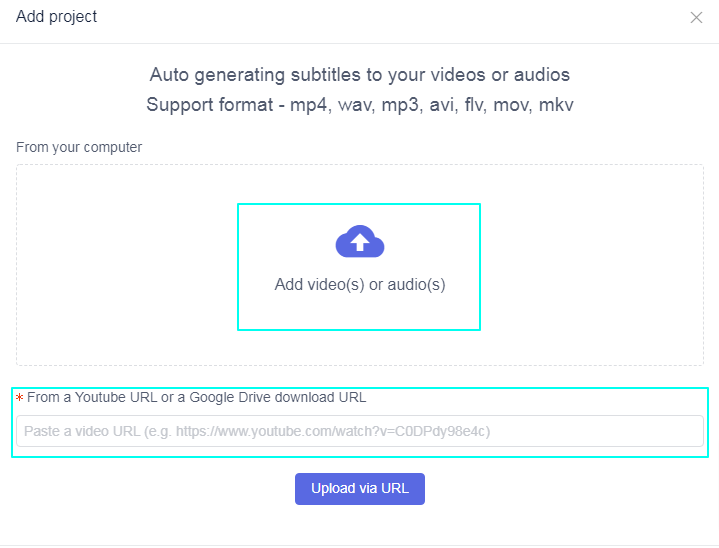
1.Upload your video
After recording a TikTok video on your phone. You need to log in to your existing EasySub account (or create a new account) and upload the video. You only need to click the upload video interface in the middle of the screen to complete this operation.
2.Edit subtitles
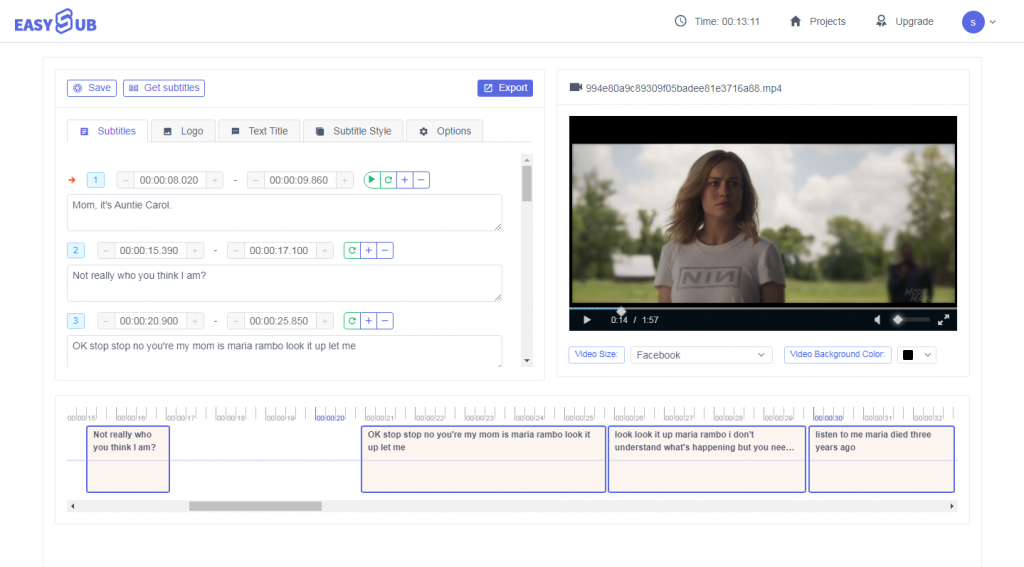
After uploading the video, EasySub will automatically transcribe and add subtitles to your video within a few minutes. After EasySub has processed the heavy work, all you have to do is to check the subtitles. You can easily make any changes you want-such as adjusting text, adding and deleting subtitles and modifying the timing of subtitles. Just follow the instructions in the editor to modify.
3.Design TikTok style for video
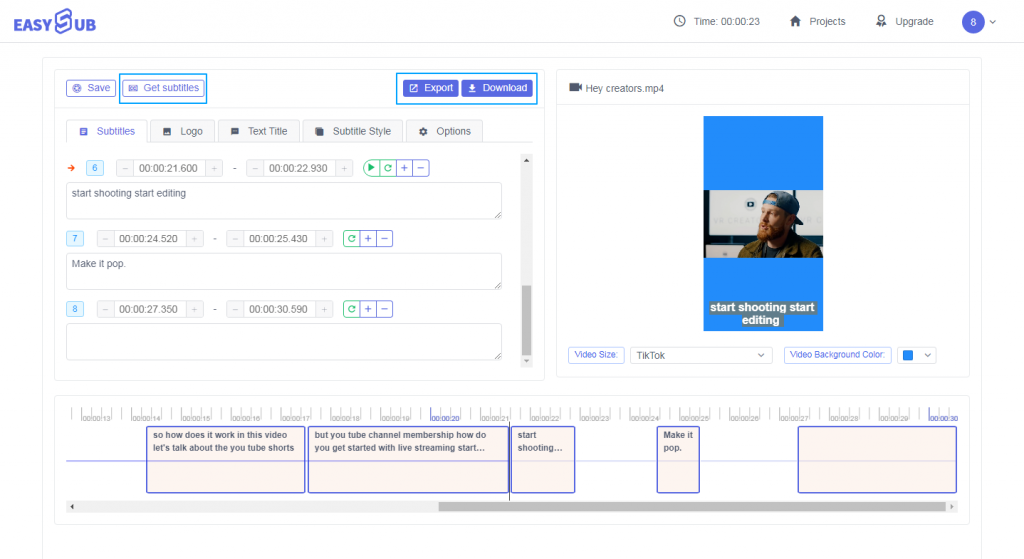
Under the SETTINGS tab, you can spend some time viewing all the features of EasySub. Choose from a library of pre-designed subtitle styles, add your own custom colors and fonts, adjust the size of the subtitles, upload the logo and adjust the video to fit the TikTok resolution display.
When editing TikTok videos, what you need most is to add the title of the video and adjust the position of the video title. At the same time, you need to modify the background color of the subtitle, the font color of the subtitle, the size of the subtitle and the font of the subtitle, etc. It is also very important to add a video watermark.
When finished, it’s time to export and download the newly optimized TikTok video!
If you are new to AutoSub, you can register for an account and create your first video for free!
Finally, you can also try this free online YouTube subtitle downloader.