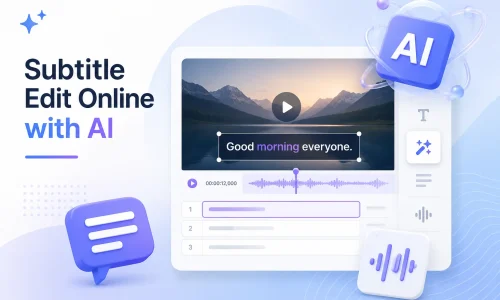
Με την πρόοδο της τεχνολογίας AI, το Subtitle Edit δεν περιορίζεται πλέον σε παραδοσιακό λογισμικό για υπολογιστές. Τώρα, μπορείτε να δημιουργείτε, να επεξεργάζεστε, να συγχρονίζετε, να μεταφράζετε και να μετατρέπετε υπότιτλους απευθείας στο πρόγραμμα περιήγησής σας—χωρίς να χρειάζεται να κατεβάσετε ή να εγκαταστήσετε πολύπλοκο λογισμικό. Το AI Subtitle Editor μπορεί να αναγνωρίζει αυτόματα τον ήχο βίντεο και να δημιουργεί γρήγορα υπότιτλους.
Αυτό το διαδικτυακό εργαλείο επεξεργασίας υποτίτλων με τεχνητή νοημοσύνη σάς βοηθά να επεξεργάζεστε αρχεία SRT πιο γρήγορα, να διορθώνετε προβλήματα συγχρονισμού υποτίτλων, να μεταφράζετε πολύγλωσσους υπότιτλους, ακόμη και να τροποποιείτε περιεχόμενο υποτίτλων στο YouTube. Σε αυτόν τον οδηγό, θα μάθετε τι είναι η Επεξεργασία Υποτίτλων, πώς να επεξεργάζεστε υπότιτλους στο διαδίκτυο και πώς να χρησιμοποιείτε την τεχνολογία τεχνητής νοημοσύνης για να βελτιώσετε την αποτελεσματικότητα της παραγωγής υποτίτλων.
Πίνακας περιεχομένων
Τι είναι η επεξεργασία υποτίτλων;
Επεξεργασία υποτίτλων Αναφέρεται στην πλήρη διαδικασία δημιουργίας, επεξεργασίας, συγχρονισμού, μετάφρασης και εξαγωγής αρχείων υποτίτλων. Τα αρχεία υποτίτλων συνήθως περιλαμβάνουν μορφές όπως SRT, VTT και ASS, οι οποίες χρησιμοποιούνται για την εμφάνιση κειμένου σε περιεχόμενο βίντεο.
Η παραδοσιακή επεξεργασία υποτίτλων βασίζεται σε χειρωνακτική εργασία. Οι χρήστες πρέπει να εισάγουν χειροκίνητα κείμενο και να προσαρμόζουν τη χρονογραμμή γραμμή προς γραμμή. Αυτή η διαδικασία είναι αρκετά χρονοβόρα. Έρευνες δείχνουν ότι η χειροκίνητη δημιουργία υποτίτλων για ένα βίντεο 1 λεπτού διαρκεί κατά μέσο όρο 5-10 λεπτά, ανάλογα με την πολυπλοκότητα του περιεχομένου.
Οι σύγχρονοι επεξεργαστές υποτίτλων μεταμορφώνονται από την τεχνολογία τεχνητής νοημοσύνης. Επεξεργαστές υποτίτλων με τεχνητή νοημοσύνη μπορούν να αναγνωρίσουν αυτόματα το προφορικό περιεχόμενο και να δημιουργήσουν το αρχικό κείμενο υποτίτλων. Ταυτόχρονα, μπορούν να ευθυγραμμίσουν αυτόματα τη χρονογραμμή, μειώνοντας την ανάγκη για χειροκίνητο συγχρονισμό.
Σε πρακτικές εφαρμογές, οι επεξεργαστές υποτίτλων με τεχνητή νοημοσύνη μπορούν να ενισχύσουν την αποτελεσματικότητα της παραγωγής υποτίτλων κατά 60%–90%, ιδιαίτερα σε σενάρια που περιλαμβάνουν πολύγλωσσα βίντεο, δημιουργία περιεχομένου στο YouTube και βίντεο μάρκετινγκ.
Συνήθεις προκλήσεις επεξεργασίας υποτίτλων
Στην πραγματική διαδικασία παραγωγής υποτίτλων, τα προβλήματα που αντιμετωπίζουν οι χρήστες συχνότερα επικεντρώνονται σε τέσσερις τομείς: το χρονοδιάγραμμα, την αποτελεσματικότητα, την πολυγλωσσική υποστήριξη και την πολυπλοκότητα των λειτουργιών της πλατφόρμας.
α. Ο συγχρονισμός των υποτίτλων δεν είναι συγχρονισμένος
Η λανθασμένη ευθυγράμμιση του χρονισμού των υποτίτλων είναι ένα από τα πιο συνηθισμένα προβλήματα. Συνήθως εμφανίζεται μετά την επεξεργασία βίντεο, όταν η χρονική γραμμή δεν έχει επαναευθυγραμμιστεί. Μπορεί επίσης να προκληθεί από σφάλματα στην αυτόματη αναγνώριση υποτίτλων.
Η λύση συνήθως περιλαμβάνει χειροκίνητη διόρθωση του χρονισμού χρησιμοποιώντας συγχρονισμός υποτίτλων ή εργαλεία ρύθμισης χρονισμού υποτίτλων. Ωστόσο, στην πράξη, η χειροκίνητη ρύθμιση κάθε γραμμής υποτίτλων είναι χρονοβόρα.
β. Η χειροκίνητη επεξεργασία υποτίτλων διαρκεί πολύ
Το παραδοσιακό λογισμικό επεξεργασίας υποτίτλων βασίζεται στη χειροκίνητη εισαγωγή και στη διόρθωση γραμμής προς γραμμή. Τα κύρια προβλήματα είναι η υψηλή επαναληψιμότητα των προσαρμογών του χρονοδιαγράμματος και η δυσκολία μαζικής επεξεργασίας μεγάλων όγκων βίντεο. Για τις ομάδες περιεχομένου -ειδικά για εκείνες που διαχειρίζονται κανάλια βίντεο YouTube ή βίντεο μικρής διάρκειας- η παραγωγή υποτίτλων συχνά αποτελεί εμπόδιο στη διαδικασία παραγωγής.
γ. Ανάγκη για υπότιτλους σε πολλές γλώσσες
Οι δημιουργοί διασυνοριακού περιεχομένου συνήθως απαιτούν υποστήριξη πολυγλωσσικών υποτίτλων, όπως Αγγλικά, Ισπανικά ή Γαλλικά. Η χειροκίνητη μετάφραση είναι δαπανηρή και, καθώς το μήκος των εκφράσεων ποικίλλει μεταξύ των γλωσσών, το χρονοδιάγραμμα πρέπει να αναπροσαρμοστεί. Τα εργαλεία μετάφρασης υποτίτλων μπορούν να βελτιώσουν την αποτελεσματικότητα, αλλά οι παραδοσιακές μέθοδοι εξακολουθούν να απαιτούν χειροκίνητη διόρθωση. Στην παγκόσμια διανομή περιεχομένου, οι πολύγλωσσοι υπότιτλοι είναι ένας από τους βασικούς παράγοντες για τη βελτίωση των ποσοστών προβολής.
δ. Η επεξεργασία υποτίτλων στο YouTube είναι περίπλοκη
Η διαχείριση των υποτίτλων στο YouTube γίνεται συνήθως μέσω του YouTube Studio ή εξωτερικών αρχείων SRT. Οι ροές εργασίας είναι ασυνεπείς και η καμπύλη εκμάθησης είναι απότομη για τους αρχάριους. Η ακρίβεια των αυτόματων υποτίτλων είναι επίσης ασυνεπής, απαιτώντας συχνά περαιτέρω επεξεργασία.
Πώς το AI Subtitle Editor λύνει προβλήματα επεξεργασίας υποτίτλων;
Ο Επεξεργαστής Υποτίτλων AI βελτιώνει κυρίως την αποτελεσματικότητα μέσω πέντε βασικών διαδικασιών: δημιουργία, επεξεργασία, συγχρονισμός, μετάφραση και εξαγωγή.
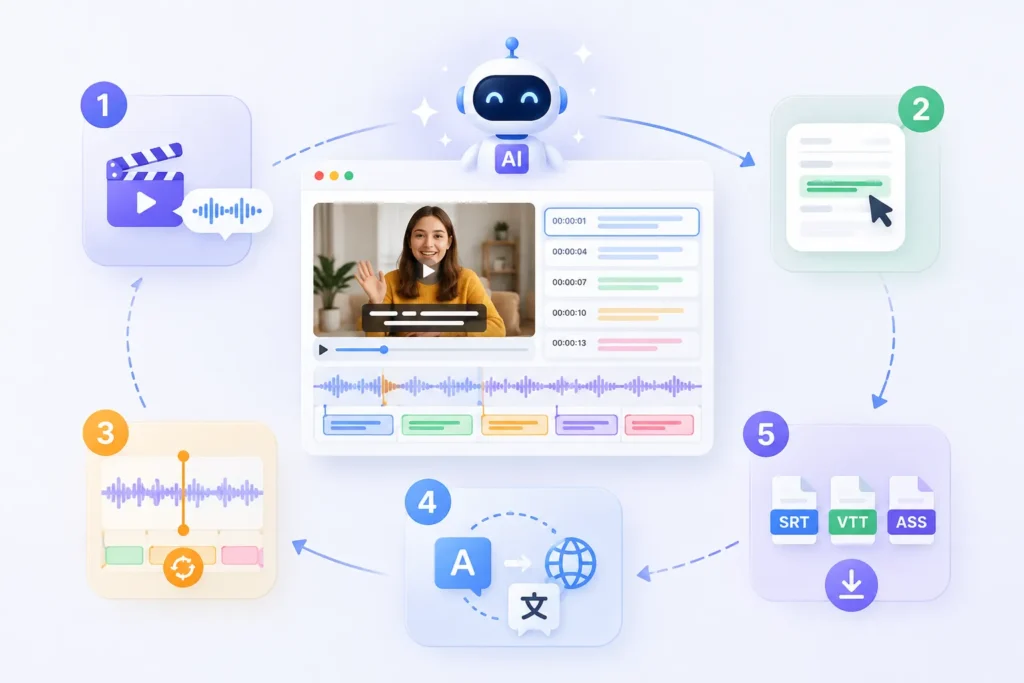
Ο Γεννήτρια υποτίτλων AI μπορεί να δημιουργήσει αυτόματα περιεχόμενο υπότιτλων με βάση την αναγνώριση ομιλίας. Οι χρήστες δεν χρειάζεται να εισάγουν κείμενο πρόταση προς πρόταση. Το σύστημα εξάγει απευθείας ομιλία από τον ήχο του βίντεο και δημιουργεί ένα αρχικό αρχείο υπότιτλων. Σε σύγκριση με τις παραδοσιακές μεθόδους χειροκίνητης μεταγραφής, η απόδοση συνήθως βελτιώνεται κατά περισσότερο από 70%.
2. Επεξεργαστείτε υπότιτλους στο διαδίκτυο
Οι χρήστες μπορούν να επεξεργαστούν το περιεχόμενο των υποτίτλων απευθείας στο πρόγραμμα περιήγησής τους χωρίς να εγκαταστήσουν κανένα λογισμικό επεξεργασίας υποτίτλων. Όλοι οι υπότιτλοι εμφανίζονται σε μια χρονική γραμμή, επιτρέποντας γρήγορες τροποποιήσεις κειμένου, αναδιάρθρωση προτάσεων και βελτιστοποίηση εκφράσεων. Το εργαλείο υποστηρίζει επίσης προεπισκοπήσεις βίντεο σε πραγματικό χρόνο.
Το σύστημα τεχνητής νοημοσύνης ευθυγραμμίζει αυτόματα τους υπότιτλους με τον ήχο, μειώνοντας την ανάγκη για χειροκίνητες ρυθμίσεις χρονισμού. Ακόμα και αν το βίντεο έχει υποστεί επεξεργασία ή περικοπή, το σύστημα μπορεί να υπολογίσει ξανά τις θέσεις στη χρονογραμμή. Αυτό έχει ως αποτέλεσμα σημαντική αύξηση της απόδοσης σε σύγκριση με τις χειροκίνητες ρυθμίσεις.
4. Μεταφράστε υπότιτλους άμεσα
Μετάφραση υποτίτλων με τεχνητή νοημοσύνη μπορεί να μετατρέψει γρήγορα υπότιτλους σε πολλές γλώσσες, όπως Αγγλικά, Ισπανικά και Γαλλικά. Το μεταφρασμένο αποτέλεσμα διατηρεί αυτόματα την αρχική δομή της χρονογραμμής, εξαλείφοντας την ανάγκη αναδιαμόρφωσης κάθε γραμμής ξεχωριστά. Για διασυνοριακή διανομή περιεχομένου, αυτό το βήμα μπορεί να μειώσει σημαντικά το κόστος εργασίας.
5. Εξαγωγή SRT, VTT, ASS
Το σύστημα υποστηρίζει εξαγωγή σε πολλαπλές mainstream μορφές υποτίτλων, συμπεριλαμβανομένων SRT, VTT, και ASS. Οι χρήστες μπορούν να εξάγουν αρχεία απευθείας για χρήση σε διαφορετικές πλατφόρμες—για παράδειγμα, το VTT χρησιμοποιείται στο YouTube, ενώ το ASS χρησιμοποιείται συνήθως στην παραγωγή ταινιών και τηλεοπτικών σειρών.
Η βασική διαδικασία της επεξεργασίας υποτίτλων στο διαδίκτυο είναι στην πραγματικότητα αρκετά τυπική. Για τους σύγχρονους επεξεργαστές υποτίτλων με τεχνητή νοημοσύνη, αυτή η διαδικασία έχει απλοποιηθεί σημαντικά. Οι χρήστες μπορούν να δημιουργήσουν επαγγελματικούς υπότιτλους με λίγα μόνο απλά βήματα.
Βήμα 1: Ανεβάστε το βίντεό σας
.webp)
Το πρώτο βήμα είναι να ανεβάσετε ένα αρχείο βίντεο ή να επικολλήσετε έναν σύνδεσμο βίντεο. Το σύστημα θα αναλύσει αυτόματα το ηχητικό περιεχόμενο.
Οι συνήθεις υποστηριζόμενες μορφές περιλαμβάνουν συνδέσμους MP4, MOV και YouTube. Ο κύριος σκοπός αυτού του βήματος είναι να επιτρέψει στο σύστημα να καταγράψει δεδομένα ήχου ως προετοιμασία για την επακόλουθη δημιουργία υποτίτλων.
-1024x700.webp)
Μόλις ολοκληρωθεί η μεταφόρτωση, το σύστημα τεχνητής νοημοσύνης αναγνωρίζει αυτόματα την ομιλία και δημιουργεί υπότιτλους. Αυτή η διαδικασία δεν απαιτεί χειροκίνητη εισαγωγή κειμένου. Σε σύγκριση με το παραδοσιακό λογισμικό επεξεργασίας υποτίτλων, η αύξηση της αποτελεσματικότητας είναι σημαντική. Ένα πρώτο προσχέδιο υποτίτλων δημιουργείται συνήθως σε λίγα μόλις λεπτά.
Βήμα 3: Έλεγχος και επεξεργασία κειμένου υποτίτλων
-1024x680.webp)
Αφού δημιουργηθούν οι υπότιτλοι, οι χρήστες μπορούν να έχουν πρόσβαση στη διεπαφή επεξεργασίας για να κάνουν αλλαγές, όπως διόρθωση τυπογραφικών λαθών, προσαρμογή της δομής των προτάσεων και βελτιστοποίηση της σημασιολογικής έκφρασης. Οι διαδικτυακοί επεξεργαστές υποτίτλων συνήθως υποστηρίζουν προεπισκοπήσεις βίντεο σε πραγματικό χρόνο, διευκολύνοντας τον έλεγχο της ακρίβειας του περιεχομένου σε συγχρονισμό με το βίντεο.
Βήμα 4: Προσαρμογή χρονισμού υποτίτλων
Εάν υπάρχει κάποια ασυμφωνία μεταξύ των υποτίτλων και του ήχου, μπορείτε να προσαρμόσετε τη χρονογραμμή χειροκίνητα ή αυτόματα. Τα εργαλεία τεχνητής νοημοσύνης συνήθως προσφέρουν μια λειτουργία συγχρονισμού υποτίτλων που ευθυγραμμίζεται αυτόματα με τον ρυθμό της ομιλίας. Για βίντεο YouTube ή περιεχόμενο βίντεο σύντομης μορφής, αυτό το βήμα μπορεί να μειώσει σημαντικά τον χρόνο που απαιτείται για χειροκίνητη διόρθωση.
Βήμα 5: Εξαγωγή αρχείων υποτίτλων
-1024x486.webp)
Το τελευταίο βήμα είναι η εξαγωγή των αρχείων υποτίτλων. Οι συνήθεις μορφές περιλαμβάνουν:
- SRT (γενική μορφή υποτίτλων)
- VTT (χρησιμοποιείται για τον ιστό και το YouTube)
- ASS (για μεταπαραγωγή ταινιών και τηλεόρασης)
Μπορείτε να τα κατεβάσετε απευθείας ή να τα ενσωματώσετε στο βίντεό σας για χρήση.
Πώς να επεξεργαστείτε υπότιτλους στο YouTube (3 πρακτικές μέθοδοι που εξηγούνται)
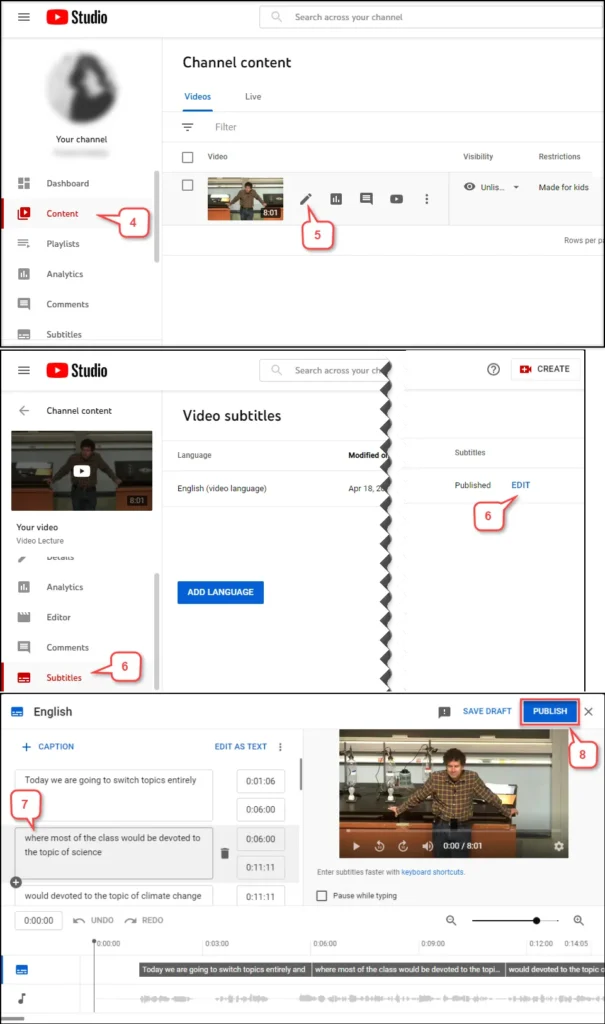
Υπάρχουν τρεις βασικοί τρόποι επεξεργασίας υποτίτλων στο YouTube: απευθείας επεξεργασία στο YouTube Studio, λήψη ενός αρχείου SRT για χειροκίνητη επεξεργασία και χρήση ενός εργαλείου επεξεργασίας υποτίτλων με τεχνητή νοημοσύνη για αυτόματη επεξεργασία.
Μέθοδος 1: Επεξεργασία υποτίτλων στο YouTube Studio
Αυτή είναι η πιο βασική μέθοδος. Μπορείτε να τροποποιήσετε απευθείας τα αυτόματα δημιουργημένα ή μεταφορτωμένα αρχεία υποτίτλων στο YouTube Studio. Η διαδικασία είναι σχετικά απλή, αλλά η λειτουργικότητα είναι περιορισμένη. Τα κύρια προβλήματα, ωστόσο, είναι ότι η διεπαφή επεξεργασίας δεν είναι πολύ εύχρηστη και οι προσαρμογές χρονοδιαγράμματος είναι αναποτελεσματικές, καθιστώντας την ακατάλληλη για μαζική επεξεργασία βίντεο. Είναι κατάλληλη μόνο για μικρές επεξεργασίες σε μεμονωμένα βίντεο.
Μέθοδος 2: Λήψη SRT και επεξεργασία με μη αυτόματο τρόπο
Η δεύτερη μέθοδος περιλαμβάνει την εξαγωγή του αρχείου υποτίτλων (συνήθως σε μορφή SRT) και στη συνέχεια την τροποποίησή του χρησιμοποιώντας λογισμικό επεξεργασίας υποτίτλων. Αρχικά, κατεβάστε τους υπότιτλους, επεξεργαστείτε τους τοπικά και, στη συνέχεια, ανεβάστε τους ξανά στο YouTube.
Το πλεονέκτημα αυτής της προσέγγισης είναι ότι προσφέρει πιο ακριβή έλεγχο, επιτρέποντάς σας να προσαρμόσετε τον χρόνο και το περιεχόμενο κειμένου κάθε υπότιτλου. Ωστόσο, περιλαμβάνει πολλά βήματα και βασίζεται σε λογισμικό επεξεργασίας υποτίτλων. Είναι κατάλληλο για χρήστες με εμπειρία στην παραγωγή υποτίτλων.
Μέθοδος 3: Χρησιμοποιήστε έναν επεξεργαστή υποτίτλων AI
Η τρίτη μέθοδος είναι προς το παρόν η πιο αποτελεσματική λύση. Ένας επεξεργαστής υποτίτλων με τεχνητή νοημοσύνη μπορεί να χειριστεί ολόκληρη τη διαδικασία απευθείας: μεταφόρτωση βίντεο → αυτόματη δημιουργία υποτίτλων → αυτόματος συγχρονισμός χρονοδιαγράμματος → ηλεκτρονική επεξεργασία → εξαγωγή με ένα κλικ. Σε σύγκριση με τις παραδοσιακές μεθόδους, αυτή η προσέγγιση μπορεί να μειώσει τον χρόνο παραγωγής υποτίτλων κατά περίπου 60%–90%. Επιπλέον, υποστηρίζει τη δημιουργία και μετάφραση πολυγλωσσικών υποτίτλων, καθιστώντας την ιδανική για διεθνείς λειτουργίες περιεχομένου YouTube.
Μπορείτε να επεξεργαστείτε υπότιτλους στο Anilab; (Επεξήγηση ενσωματωμένων έναντι επεξεργάσιμων υπότιτλων)
Εάν οι υπότιτλοι είναι ξεχωριστά αρχεία, όπως SRT ή VTT, μπορείτε να τους επεξεργαστείτε απευθείας χρησιμοποιώντας ένα πρόγραμμα επεξεργασίας υποτίτλων. Εάν οι υπότιτλοι είναι ενσωματωμένοι απευθείας στο βίντεο (ενσωματωμένοι υπότιτλοι), δεν μπορείτε να επεξεργαστείτε απευθείας το κείμενο. Θα πρέπει πρώτα να εξαγάγετε τους υπότιτλους ή να χρησιμοποιήσετε την αναγνώριση OCR.
Περίπτωση 1: Επεξεργάσιμοι υπότιτλοι
Όταν οι υπότιτλοι υπάρχουν ως ξεχωριστά αρχεία, όπως SRT ή VTT, μπορείτε να τους επεξεργαστείτε απευθείας.
Λήψη του αρχείου υποτίτλων → Άνοιγμα ενός προγράμματος επεξεργασίας υποτίτλων → Επεξεργασία κειμένου και χρονοδιαγράμματος → Επανεξαγωγή
Αυτή η μέθοδος είναι απλή και λειτουργεί για υπότιτλους που εξάγονται από τις περισσότερες mainstream πλατφόρμες βίντεο.
Περίπτωση 2: Ενσωματωμένοι υπότιτλοι
Εάν οι υπότιτλοι έχουν “ενσωματωθεί” στο καρέ του βίντεο, θεωρούνται ενσωματωμένοι υπότιτλοι. Σε αυτήν την περίπτωση, οι υπότιτλοι δεν αποτελούν πλέον ξεχωριστό αρχείο και δεν μπορούν να επεξεργαστούν απευθείας. Συνήθως, θα χρειαστεί να χρησιμοποιήσετε ένα εργαλείο OCR για να αναγνωρίσετε τους υπότιτλους ή να μεταγράψετε τον ήχο για να δημιουργήσετε νέους υπότιτλους.
Αυτή η διαδικασία είναι πιο περίπλοκη από την τυπική επεξεργασία υποτίτλων και ενδέχεται να περιλαμβάνει σφάλματα αναγνώρισης.
Στην πραγματική ροή εργασίας επεξεργασίας υποτίτλων, συνιστάται να δοθεί προτεραιότητα στην απόκτηση του αρχικού αρχείου υποτίτλων. Εάν είναι διαθέσιμο μόνο το ίδιο το αρχείο βίντεο, θα χρειαστεί να βασιστείτε σε ένα πρόγραμμα επεξεργασίας υποτίτλων με τεχνητή νοημοσύνη για την αναδημιουργία των υποτίτλων.
Συχνές ερωτήσεις για την επεξεργασία υποτίτλων
Ε1. Τι είναι η επεξεργασία υποτίτλων;
Η επεξεργασία υποτίτλων αναφέρεται στη διαδικασία δημιουργίας, τροποποίησης, συγχρονισμού, μετάφρασης και εξαγωγής αρχείων υποτίτλων. Οι συνήθεις μορφές υποτίτλων περιλαμβάνουν τις SRT, VTT και ASS. Ο κύριος στόχος είναι να διασφαλιστεί ότι οι υπότιτλοι συγχρονίζονται με ακρίβεια με τον ήχο του βίντεο.
Ε2. Πώς μπορώ να επεξεργαστώ υπότιτλους online;
Η επεξεργασία υποτίτλων στο διαδίκτυο περιλαμβάνει συνήθως τρία βήματα: τη μεταφόρτωση ενός βίντεο, την αυτόματη δημιουργία υποτίτλων και την επεξεργασία του περιεχομένου και της χρονογραμμής στο διαδίκτυο. Τα σύγχρονα προγράμματα επεξεργασίας υποτίτλων υποστηρίζουν λειτουργίες που βασίζονται σε πρόγραμμα περιήγησης, επιτρέποντάς σας να ολοκληρώσετε τις επεξεργασίες χωρίς να εγκαταστήσετε κανένα λογισμικό.
Ε3. Μπορώ να επεξεργαστώ υπότιτλους στο YouTube;
Ναι, μπορείτε να επεξεργαστείτε υπότιτλους στο YouTube. Μπορείτε να τους τροποποιήσετε απευθείας στο YouTube Studio ή να κατεβάσετε το αρχείο SRT, να το επεξεργαστείτε χρησιμοποιώντας λογισμικό επεξεργασίας υποτίτλων και στη συνέχεια να το ανεβάσετε ξανά.
Ε4. Μπορώ να επεξεργαστώ αρχεία SRT;
Ναί. SRT είναι μια από τις πιο συνηθισμένες μορφές υποτίτλων. Μπορείτε να το ανοίξετε με ένα πρόγραμμα επεξεργασίας υποτίτλων για να τροποποιήσετε το περιεχόμενο κειμένου και τη χρονογραμμή και, στη συνέχεια, να το εξαγάγετε ξανά για χρήση.
Ε5. Ποιες μορφές υποτίτλων υποστηρίζονται;
Οι κύριες μορφές υποτίτλων περιλαμβάνουν τα SRT, VTT, ASS, SSA και STL. Διαφορετικές πλατφόρμες χρησιμοποιούν διαφορετικές μορφές. Για παράδειγμα, το YouTube χρησιμοποιεί συνήθως το VTT, ενώ η κινηματογραφική και τηλεοπτική παραγωγή χρησιμοποιεί συχνά το ASS.
Ναι. Μια γεννήτρια υποτίτλων με τεχνητή νοημοσύνη μπορεί να αναγνωρίζει αυτόματα την ομιλία σε ένα βίντεο και να δημιουργεί υπότιτλους, ενώ παράλληλα υποστηρίζει συγχρονισμό χρονοδιαγράμματος και πολύγλωσση μετάφραση, βελτιώνοντας σημαντικά την αποδοτικότητα της παραγωγής.
Ε7. Ποιο είναι το καλύτερο πρόγραμμα επεξεργασίας υποτίτλων;
Το καλύτερο εργαλείο επεξεργασίας υποτίτλων εξαρτάται από την περίπτωση χρήσης. Το παραδοσιακό λογισμικό επεξεργασίας υποτίτλων είναι κατάλληλο για επαγγελματική χειροκίνητη επεξεργασία, ενώ ένα πρόγραμμα επεξεργασίας υποτίτλων με τεχνητή νοημοσύνη είναι πιο κατάλληλο για γρήγορη δημιουργία, μαζική επεξεργασία και ανάγκες για πολύγλωσσους υπότιτλους.
Ξεκινήστε να χρησιμοποιείτε το EasySub για να βελτιώσετε τα βίντεό σας σήμερα

EasySub είναι ένα διαδικτυακό εργαλείο επεξεργασίας υποτίτλων με τεχνητή νοημοσύνη που βοηθά τους χρήστες να ολοκληρώσουν γρήγορα ολόκληρη τη διαδικασία δημιουργίας, επεξεργασίας, συγχρονισμού και μετάφρασης υποτίτλων. Μπορείτε να δημιουργήσετε υπότιτλους επαγγελματικής ποιότητας απευθείας στο πρόγραμμα περιήγησής σας—δεν απαιτείται λήψη ή εγκατάσταση λογισμικού.
Απλώς ανεβάστε ένα βίντεο και το σύστημα θα δημιουργήσει αυτόματα υπότιτλους. Στη συνέχεια, μπορείτε να επεξεργαστείτε το κείμενο και να προσαρμόσετε τη χρονογραμμή online, ενώ παράλληλα θα βλέπετε σε προεπισκόπηση τα αποτελέσματα σε πραγματικό χρόνο. Αυτή η απλοποιημένη διαδικασία είναι πιο αποτελεσματική και πιο κατάλληλη για συχνούς δημιουργούς περιεχομένου και ομάδες. Υποστηρίζει την εξαγωγή σε πολλαπλές mainstream μορφές υποτίτλων, συμπεριλαμβανομένων των SRT, VTT και ASS, για να καλύψει τις ανάγκες διαφόρων σεναρίων, όπως το YouTube, τα μέσα κοινωνικής δικτύωσης και η παραγωγή ταινιών και τηλεοπτικών εκπομπών.
👉 Κάντε κλικ εδώ για μια δωρεάν δοκιμή: easyssub.com
Ευχαριστώ που διαβάσατε αυτό το ιστολόγιο. Μη διστάσετε να επικοινωνήσετε μαζί μας για περισσότερες ερωτήσεις ή ανάγκες προσαρμογής!