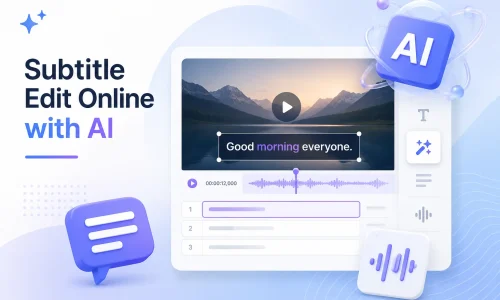
مع تطور تقنية الذكاء الاصطناعي، لم يعد تحرير الترجمة مقتصراً على برامج سطح المكتب التقليدية. الآن، يمكنك إنشاء الترجمة وتحريرها ومزامنتها وترجمتها وتحويلها مباشرةً من متصفحك، دون الحاجة إلى تنزيل أو تثبيت برامج معقدة. يستطيع محرر الترجمة المدعوم بالذكاء الاصطناعي التعرف تلقائياً على صوت الفيديو وإنشاء الترجمة بسرعة.
تساعدك أداة تحرير الترجمة المدعومة بالذكاء الاصطناعي عبر الإنترنت على تحرير ملفات SRT بسرعة أكبر، وإصلاح مشاكل مزامنة الترجمة، وترجمة الترجمات متعددة اللغات، وحتى تعديل محتوى الترجمة على يوتيوب. في هذا الدليل، ستتعرف على ماهية Subtitle Edit، وكيفية تحرير الترجمة عبر الإنترنت، وكيفية استخدام تقنية الذكاء الاصطناعي لتحسين كفاءة إنتاج الترجمة.
جدول المحتويات
ما هو تعديل الترجمة؟
تحرير الترجمة يشير هذا المصطلح إلى العملية الكاملة لإنشاء ملفات الترجمة وتحريرها ومزامنتها وترجمتها وتصديرها. تتضمن ملفات الترجمة عادةً تنسيقات مثل SRT وVTT وASS، والتي تُستخدم لعرض النصوص في محتوى الفيديو.
تعتمد عملية تحرير الترجمة التقليدية على العمل اليدوي. إذ يتعين على المستخدمين إدخال النص يدويًا وتعديل الجدول الزمني سطرًا بسطر. هذه العملية تستغرق وقتًا طويلاً. تشير الأبحاث إلى أن إنشاء ترجمة يدوية لفيديو مدته دقيقة واحدة يستغرق في المتوسط من 5 إلى 10 دقائق، وذلك بحسب مدى تعقيد المحتوى.
تُحدث تقنية الذكاء الاصطناعي تحولاً جذرياً في برامج تحرير الترجمة الحديثة. محرر ترجمة يعمل بالذكاء الاصطناعي يمكنها التعرف تلقائيًا على المحتوى المنطوق وإنشاء نص الترجمة الأولي. وفي الوقت نفسه، يمكنها محاذاة الجدول الزمني تلقائيًا، مما يقلل الحاجة إلى المزامنة اليدوية.
في التطبيقات العملية، يمكن لمحرري الترجمة بالذكاء الاصطناعي تعزيز كفاءة إنتاج الترجمة بمقدار 60%–90%، لا سيما في السيناريوهات التي تتضمن مقاطع فيديو متعددة اللغات، وإنشاء محتوى على يوتيوب، ومقاطع الفيديو التسويقية.
تحديات شائعة في تحرير الترجمة
في عملية إنتاج الترجمة الفعلية، تتمحور المشكلات التي يواجهها المستخدمون في أغلب الأحيان حول أربعة مجالات: الجدول الزمني، والكفاءة، ودعم اللغات المتعددة، وتعقيد عمليات المنصة.
أ. توقيت الترجمة غير متزامن
يُعدّ عدم تزامن توقيت الترجمة من أكثر المشاكل شيوعاً. ويحدث عادةً بعد تحرير الفيديو عندما لا تتم إعادة ضبط الخط الزمني. كما يمكن أن ينتج عن أخطاء في التعرف التلقائي على الترجمة.
يتضمن الحل عادةً تصحيح التوقيت يدويًا باستخدام مزامنة الترجمة أو أدوات ضبط توقيت الترجمة. ومع ذلك، عملياً، فإن ضبط كل سطر من سطور الترجمة يدوياً يستغرق وقتاً طويلاً.
ب. يستغرق تحرير الترجمة يدويًا وقتًا طويلاً
تعتمد برامج تحرير الترجمة التقليدية على الإدخال اليدوي والتدقيق سطرًا بسطر. وتتمثل المشكلات الرئيسية في التكرار الكبير لتعديلات الجدول الزمني وصعوبة معالجة كميات كبيرة من الفيديو دفعة واحدة. بالنسبة لفرق المحتوى، وخاصة تلك التي تدير قنوات يوتيوب أو قنوات الفيديو القصيرة، غالبًا ما يصبح إنتاج الترجمة عائقًا في عملية الإنتاج.
ج. الحاجة إلى ترجمة مكتوبة بلغات متعددة
يحتاج مُنشئو المحتوى العابر للحدود عادةً إلى دعم الترجمة المصاحبة متعددة اللغات، مثل الإنجليزية والإسبانية والفرنسية. تُعدّ الترجمة اليدوية مُكلفة، ونظرًا لاختلاف طول العبارات بين اللغات، يجب إعادة ضبط الجدول الزمني. يمكن لأدوات ترجمة الترجمة المصاحبة تحسين الكفاءة، لكن الطرق التقليدية لا تزال تتطلب التدقيق اليدوي. في توزيع المحتوى العالمي، تُعدّ الترجمة المصاحبة متعددة اللغات أحد العوامل الرئيسية في تحسين معدلات المشاهدة.
د. تعديل ترجمات يوتيوب أمر معقد
تُدار ترجمات يوتيوب عادةً عبر استوديو يوتيوب أو ملفات SRT خارجية. تختلف طرق العمل، ويحتاج المبتدئون إلى وقتٍ طويل لتعلمها. كما أن دقة الترجمة التلقائية غير مضمونة، وغالبًا ما تتطلب تعديلات إضافية.
كيف يحل محرر الترجمة المدعوم بالذكاء الاصطناعي مشاكل تحرير الترجمة؟
يعمل محرر الترجمة المدعوم بالذكاء الاصطناعي بشكل أساسي على تحسين الكفاءة من خلال خمس عمليات رئيسية: الإنشاء، والتحرير، والمزامنة، والترجمة، والتصدير.
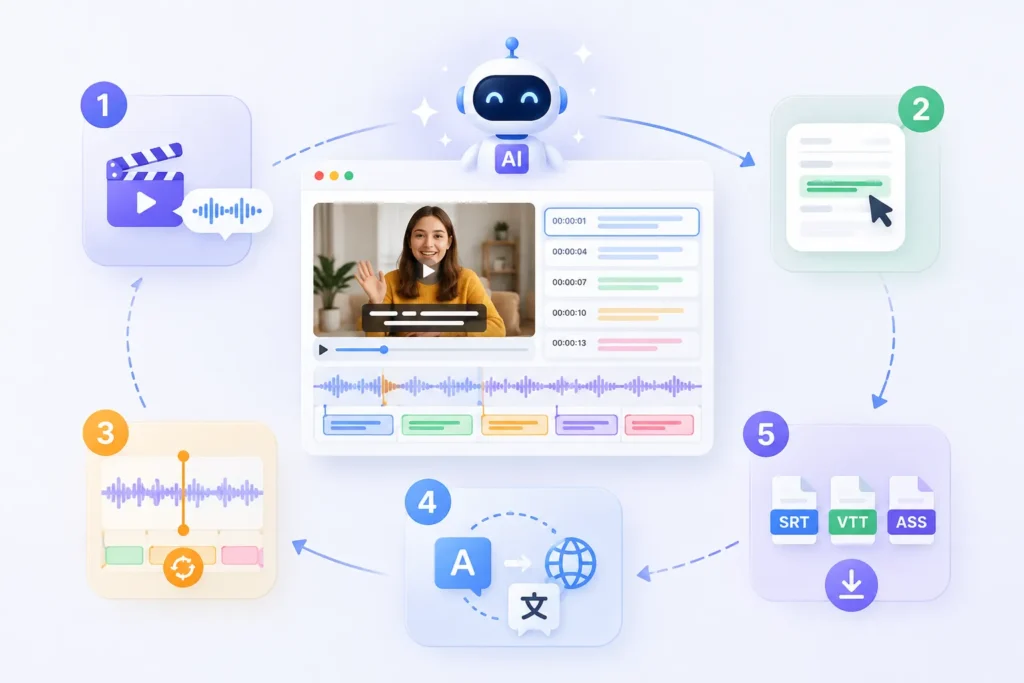
ال مولد الترجمة AI يُمكن للنظام توليد محتوى الترجمة تلقائيًا بناءً على تقنية التعرف على الكلام. لا يحتاج المستخدمون إلى إدخال النص جملةً جملة. يستخرج النظام الكلام مباشرةً من الصوت الموجود في الفيديو ويُنشئ ملف ترجمة أوليًا. بالمقارنة مع طرق النسخ اليدوية التقليدية، تتحسن الكفاءة عادةً بأكثر من 70%.
2. تعديل الترجمة عبر الإنترنت
يمكن للمستخدمين تعديل محتوى الترجمة مباشرةً في متصفحهم دون الحاجة إلى تثبيت أي برنامج لتحرير الترجمة. تُعرض جميع الترجمات على خط زمني، مما يتيح تعديل النصوص بسرعة، وإعادة صياغة الجمل، وتحسين التعبير. كما تدعم الأداة معاينة الفيديو في الوقت الفعلي.
يقوم نظام الذكاء الاصطناعي تلقائيًا بمزامنة الترجمة مع الصوت، مما يقلل الحاجة إلى تعديلات التوقيت اليدوية. حتى في حال تم تعديل الفيديو أو تقليصه، يستطيع النظام إعادة حساب مواضع التسلسل الزمني. ينتج عن ذلك زيادة ملحوظة في الكفاءة مقارنةً بالتعديلات اليدوية.
4. ترجمة الترجمة المصاحبة فوراً
ترجمة الترجمة المصاحبة للذكاء الاصطناعي يُمكن تحويل الترجمة بسرعة إلى لغات متعددة، مثل الإنجليزية والإسبانية والفرنسية. ويحافظ الناتج المترجم تلقائيًا على بنية التسلسل الزمني الأصلي، مما يُغني عن إعادة تنسيق كل سطر على حدة. وفي توزيع المحتوى عبر الحدود، تُسهم هذه الخطوة في خفض تكاليف العمالة بشكل ملحوظ.
5. تصدير SRT، VTT، ASS
يدعم النظام التصدير إلى العديد من تنسيقات الترجمة الشائعة، بما في ذلك SRT، VTT, و ASS. يمكن للمستخدمين تصدير الملفات مباشرة لاستخدامها على منصات مختلفة - على سبيل المثال، يتم استخدام VTT على YouTube، بينما يتم استخدام ASS بشكل شائع في مرحلة ما بعد إنتاج الأفلام والتلفزيون.
تُعدّ عملية تحرير الترجمة عبر الإنترنت عمليةً قياسيةً إلى حدٍّ كبير. وقد تمّ تبسيط هذه العملية بشكلٍ ملحوظ في برامج تحرير الترجمة الحديثة التي تعمل بالذكاء الاصطناعي. إذ يُمكن للمستخدمين إنشاء ترجمات احترافية ببضع خطوات بسيطة.
الخطوة الأولى: تحميل الفيديو الخاص بك
.webp)
الخطوة الأولى هي تحميل ملف فيديو أو لصق رابط فيديو. سيقوم النظام بتحليل المحتوى الصوتي تلقائيًا.
تشمل التنسيقات الشائعة المدعومة MP4 وMOV وروابط يوتيوب. والهدف الأساسي من هذه الخطوة هو تمكين النظام من التقاط البيانات الصوتية استعدادًا لإنشاء الترجمة لاحقًا.
-1024x700.webp)
بمجرد اكتمال التحميل، يتعرف نظام الذكاء الاصطناعي تلقائيًا على الكلام ويُنشئ الترجمة. لا تتطلب هذه العملية إدخال النص يدويًا. وبالمقارنة مع برامج تحرير الترجمة التقليدية، فإن التحسن في الكفاءة ملحوظ. عادةً ما يتم إنشاء مسودة أولية للترجمة في غضون دقائق معدودة.
الخطوة 3: مراجعة وتعديل نص الترجمة
-1024x680.webp)
بعد إنشاء الترجمة، يمكن للمستخدمين الوصول إلى واجهة التحرير لإجراء تغييرات، مثل تصحيح الأخطاء الإملائية، وتعديل بنية الجمل، وتحسين التعبير الدلالي. تدعم برامج تحرير الترجمة عبر الإنترنت عادةً معاينات الفيديو في الوقت الفعلي، مما يسهل التحقق من دقة المحتوى بالتزامن مع الفيديو.
الخطوة الرابعة: ضبط توقيت الترجمة
في حال وجود اختلاف بين الترجمة والصوت، يمكنك تعديل الجدول الزمني يدويًا أو تلقائيًا. توفر أدوات الذكاء الاصطناعي عادةً ميزة مزامنة الترجمة التي تُحاذي تلقائيًا إيقاع الكلام. بالنسبة لمقاطع فيديو يوتيوب أو المحتوى المرئي القصير، تُقلل هذه الخطوة بشكل كبير من الوقت اللازم للتصحيح اليدوي.
الخطوة 5: تصدير ملفات الترجمة
-1024x486.webp)
الخطوة الأخيرة هي تصدير ملفات الترجمة. تشمل التنسيقات الشائعة ما يلي:
- SRT (تنسيق الترجمة العالمي)
- VTT (يستخدم للويب ويوتيوب)
- ASS (لإنتاج الأفلام والبرامج التلفزيونية في مرحلة ما بعد الإنتاج)
يمكنك تنزيلها مباشرة أو تضمينها في الفيديو الخاص بك لاستخدامها.
كيفية تعديل ترجمات يوتيوب (شرح 3 طرق عملية)
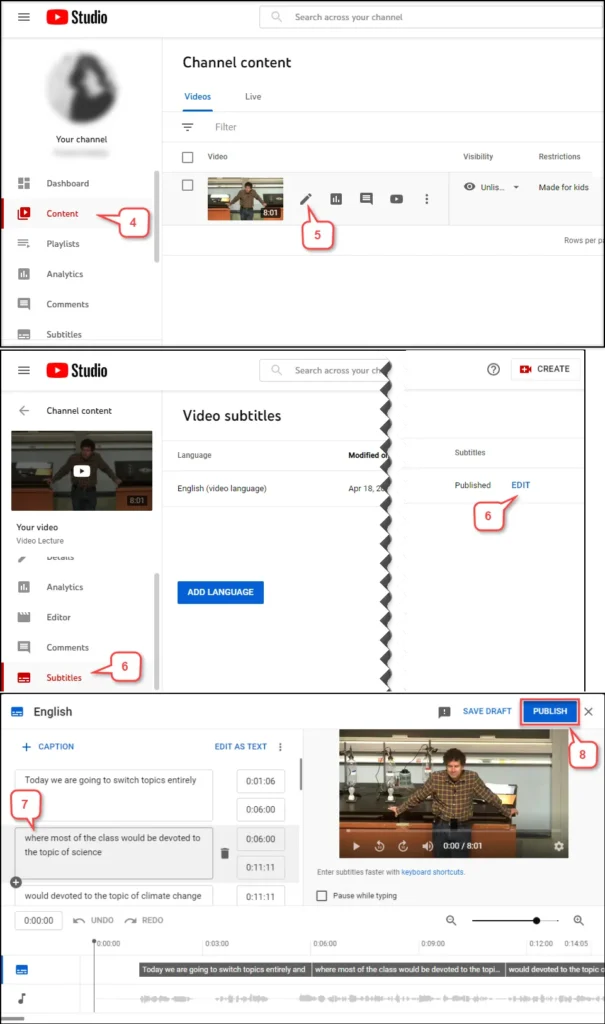
هناك ثلاث طرق رئيسية لتحرير ترجمات يوتيوب: التحرير مباشرة في استوديو يوتيوب، وتنزيل ملف SRT للتحرير اليدوي، واستخدام أداة تحرير الترجمة بالذكاء الاصطناعي للمعالجة التلقائية.
الطريقة الأولى: تعديل الترجمة في استوديو يوتيوب
هذه هي الطريقة الأساسية. يمكنك تعديل الترجمات المُنشأة تلقائيًا أو ملفات الترجمة المرفوعة مباشرةً في استوديو يوتيوب. العملية بسيطة نسبيًا، لكن وظائفها محدودة. مع ذلك، تكمن المشكلة الرئيسية في أن واجهة التحرير ليست سهلة الاستخدام، وتعديلات الخط الزمني غير فعّالة، مما يجعلها غير مناسبة لمعالجة الفيديوهات دفعةً واحدة. إنها مناسبة فقط لإجراء تعديلات طفيفة على فيديوهات فردية.
الطريقة الثانية: تحميل ملف SRT وتعديله يدويًا
تتضمن الطريقة الثانية تصدير ملف الترجمة (عادةً بصيغة SRT) ثم تعديله باستخدام برنامج تحرير الترجمة. أولاً، قم بتنزيل الترجمة، ثم عدّلها محلياً، ثم ارفعها مرة أخرى إلى يوتيوب.
تتميز هذه الطريقة بأنها توفر تحكمًا أكثر دقة، مما يسمح لك بضبط توقيت ومحتوى كل ترجمة. مع ذلك، فهي تتطلب خطوات متعددة وتعتمد على برامج تحرير الترجمة. وهي مناسبة للمستخدمين ذوي الخبرة في إنتاج الترجمة.
الطريقة الثالثة: استخدام محرر ترجمة مدعوم بالذكاء الاصطناعي
الطريقة الثالثة هي الحل الأمثل حاليًا. إذ يُمكن لمحرر الترجمة المدعوم بالذكاء الاصطناعي إدارة العملية برمتها مباشرةً: تحميل الفيديو ← إنشاء الترجمة تلقائيًا ← مزامنة الجدول الزمني تلقائيًا ← التحرير عبر الإنترنت ← التصدير بنقرة واحدة. بالمقارنة مع الطرق التقليدية، يُمكن لهذا الأسلوب تقليل وقت إنتاج الترجمة بما يتراوح بين 60 و901 تيرابايت. إضافةً إلى ذلك، يدعم هذا الأسلوب إنشاء الترجمة وترجمتها بلغات متعددة، مما يجعله مثاليًا لعمليات إنتاج محتوى يوتيوب الدولي.
هل يمكنك تعديل ترجمات برنامج أنيلاب؟ (شرح الفرق بين الترجمة المدمجة والترجمة القابلة للتعديل)
إذا كانت الترجمة ملفات منفصلة، مثل SRT أو VTT، فيمكنك تعديلها مباشرةً باستخدام برنامج تحرير الترجمة. أما إذا كانت الترجمة مضمنة في الفيديو (الترجمة المدمجة)، فلا يمكنك تعديل النص مباشرةً؛ ستحتاج إلى استخراج الترجمة أو استخدام تقنية التعرف الضوئي على الحروف (OCR) أولاً.
الحالة 1: ترجمات قابلة للتعديل
عندما تكون الترجمة موجودة كملفات منفصلة، مثل SRT أو VTT، يمكنك تعديلها مباشرة.
نزّل ملف الترجمة → افتح برنامج تحرير الترجمة → عدّل النص والجدول الزمني → أعد التصدير
هذه الطريقة بسيطة وتعمل مع الترجمات المصدرة من معظم منصات الفيديو الشائعة.
الحالة الثانية: الترجمة المضمنة
إذا تم دمج الترجمة في إطار الفيديو، تُعتبر ترجمةً مدمجة. في هذه الحالة، لا تُعدّ الترجمة ملفًا منفصلاً ولا يمكن تعديلها مباشرةً. عادةً، ستحتاج إلى استخدام أداة التعرف الضوئي على الحروف (OCR) للتعرف على الترجمة أو نسخ الصوت لإنشاء ترجمة جديدة.
تُعد هذه العملية أكثر تعقيدًا من تحرير الترجمة القياسية وقد تنطوي على أخطاء في التعرف على الترجمة.
في عملية معالجة الترجمة، يُنصح بإعطاء الأولوية للحصول على ملف الترجمة الأصلي. إذا كان ملف الفيديو فقط هو المتاح، فسيتعين عليك الاعتماد على برنامج تحرير ترجمة يعمل بالذكاء الاصطناعي لإعادة إنشاء الترجمة.
الأسئلة الشائعة حول تعديل الترجمة
س1. ما هو تحرير الترجمة؟
يشير تحرير الترجمة إلى عملية إنشاء ملفات الترجمة وتعديلها ومزامنتها وترجمتها وتصديرها. تشمل صيغ الترجمة الشائعة SRT وVTT وASS. والهدف الأساسي هو ضمان مزامنة الترجمة بدقة مع صوت الفيديو.
س2. كيف يمكنني تعديل الترجمة عبر الإنترنت؟
تتضمن عملية تحرير الترجمة عبر الإنترنت عادةً ثلاث خطوات: تحميل الفيديو، وإنشاء الترجمة تلقائيًا، وتعديل المحتوى والجدول الزمني عبر الإنترنت. تدعم برامج تحرير الترجمة الحديثة عمليات المتصفح، مما يسمح لك بإتمام التعديلات دون الحاجة إلى تثبيت أي برنامج.
س٣. هل يمكنني تعديل ترجمة فيديوهات يوتيوب؟
نعم، يمكنك تعديل ترجمات يوتيوب. يمكنك تعديلها مباشرةً في استوديو يوتيوب، أو تنزيل ملف SRT، وتعديله باستخدام برنامج تحرير الترجمة، ثم إعادة تحميله.
س4. هل يمكنني تعديل ملفات SRT؟
نعم. SRT يُعدّ هذا أحد أكثر تنسيقات الترجمة شيوعًا. يمكنك فتحه باستخدام محرر ترجمة لتعديل محتوى النص والجدول الزمني، ثم إعادة تصديره لاستخدامه.
س5. ما هي تنسيقات الترجمة المدعومة؟
تشمل تنسيقات الترجمة الشائعة SRT وVTT وASS وSSA وSTL. وتستخدم المنصات المختلفة تنسيقات مختلفة؛ على سبيل المثال، يستخدم موقع يوتيوب عادةً تنسيق VTT، بينما تستخدم إنتاجات الأفلام والتلفزيون غالبًا تنسيق ASS.
نعم. يمكن لمولد الترجمة بالذكاء الاصطناعي التعرف تلقائيًا على الكلام في الفيديو وإنشاء الترجمة، مع دعم مزامنة الجدول الزمني والترجمة متعددة اللغات، مما يحسن كفاءة الإنتاج بشكل كبير.
س7. ما هو أفضل برنامج لتحرير الترجمة؟
يعتمد اختيار أفضل أداة لتحرير الترجمة على حالة الاستخدام. فبرامج تحرير الترجمة التقليدية مناسبة للتحرير اليدوي الاحترافي، بينما يُعدّ محرر الترجمة المدعوم بالذكاء الاصطناعي أنسب للإنشاء السريع، والمعالجة الدفعية، واحتياجات الترجمة متعددة اللغات.
ابدأ باستخدام EasySub لتحسين مقاطع الفيديو الخاصة بك اليوم

EasySub هي أداة لتحرير الترجمة عبر الإنترنت مدعومة بالذكاء الاصطناعي، تُساعد المستخدمين على إتمام عملية إنشاء الترجمة وتحريرها ومزامنتها وترجمتها بسرعة وسهولة. يمكنك إنشاء ترجمات بجودة احترافية مباشرةً من متصفحك، دون الحاجة إلى تنزيل أو تثبيت أي برنامج.
ما عليك سوى تحميل الفيديو، وسيقوم النظام تلقائيًا بإنشاء الترجمة. يمكنك بعد ذلك تعديل النص وضبط الجدول الزمني عبر الإنترنت مع معاينة النتائج في الوقت الفعلي. هذه العملية المبسطة أكثر كفاءة ومناسبة بشكل أفضل لمنشئي المحتوى والفرق العاملة بشكل متكرر. يدعم النظام التصدير إلى العديد من تنسيقات الترجمة الشائعة، بما في ذلك SRT وVTT وASS، لتلبية احتياجات مختلف السيناريوهات مثل يوتيوب، ووسائل التواصل الاجتماعي، وإنتاج الأفلام والبرامج التلفزيونية.
👉 انقر هنا للحصول على نسخة تجريبية مجانية: easyssub.com
شكرا لقراءتك هذه المدونة. لا تتردد في الاتصال بنا لمزيد من الأسئلة أو احتياجات التخصيص!