
Does Instagram Video need accurate auto subtitles?
The answer is yes. Add subtitles to Instagram videos is very important. From the digital market data, we can easily see that there are more than 1 billion active users every day. The average user spends 30 minutes a day. But another fact is that the accuracy of subtitles generated by default for Instagram videos is very low, which greatly affects the user experience. If you are a video creator, then we need to find the best solution to add subtitles to Instagram videos.
From here, I think you will know what is important to your Instagram video. Yes, it is subtitles and subtitles. In a way, adding subtitles and subtitles to your Instagram videos is the best way to let others watch your videos.
However, most Instagram users do not have professional skills in video editing and subtitle production. In this case, online automatic subtitles and automatic subtitle generators will be of great help. Fortunately, you found one. It is EasySub.
How to Add Subtitles To Instagram Videos by using EasySub?
But how do we use EasySub to automatically add subtitles and captions online? this is very simple. let’s start!
First, you should have an account on EasySub. A valid account can save your videos and other data. This is very important.
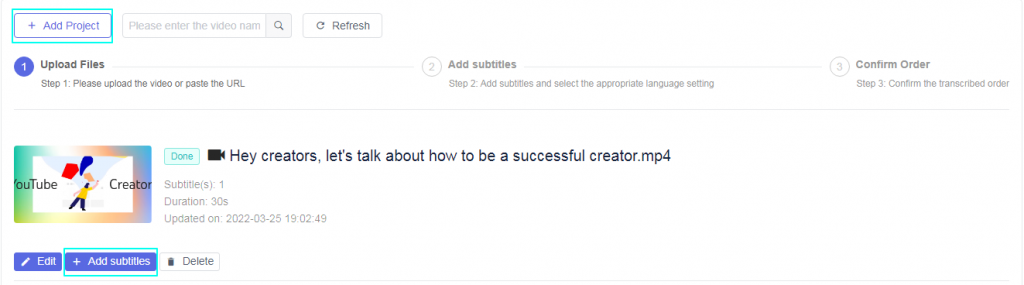
Steps for usage
Then, click the “Add Project” block to upload or drag your video. Don’t forget to choose the video language. If necessary, you can also select the translation language. Subtitle translation in EasySub is completely free. This means you don’t have to pay extra for translation. Only online automatic subtitles are good. [Understand the difference between automatic subtitles and other subtitles.
Next, click the “Next” button and wait for the transcription result. After the subtitles are generated, you can edit and change the style. In addition, you can add subtitles to the video.
In Instagram, please follow the steps below:
- Click the photo/video in the timeline or news feed.
- Click Upload Photo/Video and select a video from your computer, then click Publish.
- When your video is available for viewing, Facebook will notify you. Click the notification or gray date and time at the top of the post on the newsletter or timeline.
- Hover your mouse over the video, click the option at the bottom and select Edit this video.
- Click Choose File under Upload SRT File, and then select the .srt file you exported from the automatic subtitles. (Note: You need to rename the file to filename.en_US.srt).
- Click Save.