
How To Download SRT And TXT Subtitle Files From YouTube Videos(2024)?

Articles and tutorials for more creativity

How To Download SRT And TXT Subtitle Files From YouTube Videos
Want to track your favorite YouTube videos or get free subtitles? One way is to extract the automatic transcription from YouTube and obtain subtitles or transcription files from it. But not all methods are equal. Here is how to manually or automatically download SRT or TXT files from YouTube videos.

Why download SRT and TXT subtitle files from YouTube?

When the video is uploaded to YouTube, the platform will automatically add subtitles to it. This allows a very wide audience to access any type of video content. Another benefit is that you can directly access a very large video transcription library. You can save excerpts of the video or benefit from free subtitles on the video.

But please note that these transcripts are not completely accurate, so you may not be able to use them this way (although our subtitle editor allows you to do so). I can only say that you can’t have everything!

If you want to take advantage of YouTube’s automatic captions, please follow the steps below.

Recommend the best way to download SRT And TXT Subtitle

Downsub

Downsub is the most widely used YouTube subtitle download tool. It will immediately extract the automatic transcription of the video, and you can translate it into multiple languages. The service is easy to use and the download process is very fast. There is nothing better than making the results within reach.

EasySub
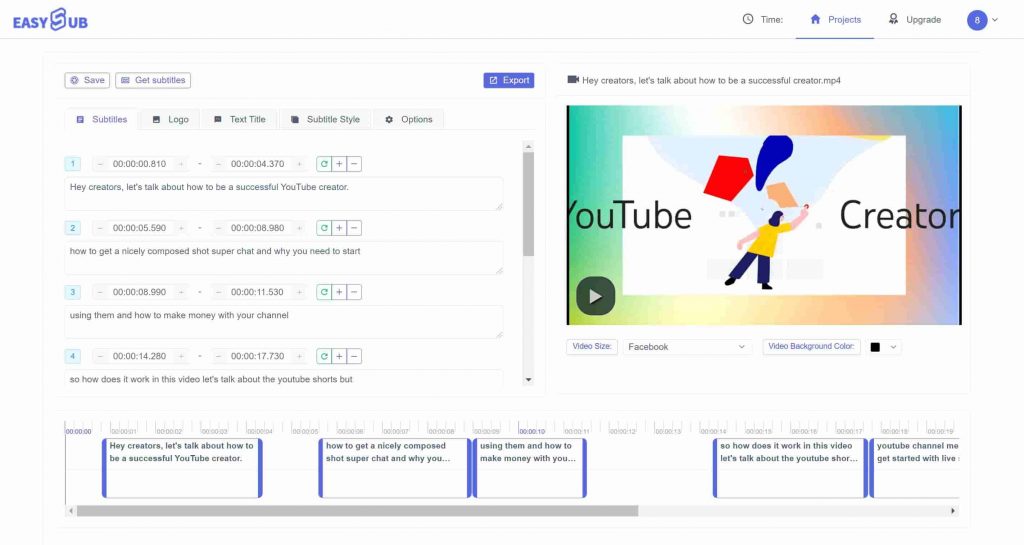
download SRT online

If you want higher quality subtitles, EasySub not only provides the same service quality as SublDl (SRT, TXT, translation), but also allows you to edit on its dedicated subtitle editor. This way, you can immediately improve the problematic YouTube subtitles. If you want perfect subtitles, this is really the best choice.

We will let you give it a try. If not, we hope we have helped you share information about the best YouTube content!

Popular Readings

Subtitling Guidelines

Standard Subtitling Guidelines

If you want to create effective subtitles, you must follow clear subtitling guidelines: limit each line to 5–7 words, use a font size of at least 12pt, and ensure high-contrast white text on a black background. These are proven subtitling best practices. In fast-paced environments like TikTok, if your subtitles aren’t concise, clear, and eye-catching

Best AI Subtitles for TikTok

Best AI Subtitles for TikTok

If you’re creating content for TikTok, relying solely on the platform’s built-in subtitles isn’t enough. You need higher accuracy, faster processing speeds, and a more professional presentation of subtitles. An AI subtitling tool can help address these challenges. It can automatically generate subtitles, support multiple languages, and significantly enhance the video viewing experience. By using

Kapwing Alternatives

10 Best Kapwing Alternatives for Video Editing and Subtitles

What Is the Best Kapwing Alternative? Kapwing is an online video editing and captioning tool used by many creators to trim videos and generate subtitles. However, its free version comes with watermarks, feature limitations, and performance issues. So what are some good Kapwing alternatives? VEED.io is the closest browser-based video editor, CapCut offers a free,

DMCA
PROTECTED